
Payment status lifecycle
Lean uses webhooks to notify your system about any changes in the lifecycle of a payment consisting of defined set of statuses that reflect the processing stage within Lean and the end user's bank. These events allow your backend to stay synchronized with Lean’s processing state without the need for frequent polling.
For Single Instant Payments and Account-on-File payments, once a payment initiation has been completed, Lean will emit webhook events asynchronously as the payment progresses.
- payment.created is sent when a payment request is created with the bank.
payment.createdcontains the initial status Lean receives from the bank in response to the payment initiation request.payment.createdcan contain intermediate or a terminal status.
- payment.updated is sent for subsequent status updates.
- If Lean receives an intermediate status from the bank in the initial response, Lean will continue to poll the bank and listen to webhook events for a terminal status. This is thew status that will be returned in the
payment.updatedwebhook
- If Lean receives an intermediate status from the bank in the initial response, Lean will continue to poll the bank and listen to webhook events for a terminal status. This is thew status that will be returned in the
{
  "type": "payment.created",
  "payload": {
    "id": "f672849b-b4f1-46b1-99cd-80e0bd24c6c0",
    "customer_id": "CUSTOMER_ID_RELATED_TO_PAYMENT",
    "intent_id": "INTENT_ID_RELATED_TO_PAYMENT",
    "status": "PENDING_WITH_BANK",
    "amount": 12.34,
    "currency": "AED",
    "payment_destination_id": "DESTINATION_ID_RELATED_TO_PAYMENT"
  },
  "message": "A payment object has been created.",
  "timestamp": "2025-12-17T13:59:32.008767568Z",
  "event_id": "7d1e3de6-fb8b-4480-8652-903c75b8b8c8"
}{
"type": "payment.updated",
"payload": {
"id": "f672849b-b4f1-46b1-99cd-80e0bd24c6c0",
"customer_id": "CUSTOMER_ID_RELATED_TO_PAYMENT",
"intent_id": "INTENT_ID_RELATED_TO_PAYMENT",
"status": "ACCEPTED_BY_BANK",
"amount": 12.34,
"currency": "AED",
"bank_transaction_reference": "528b2b3c-128a-4b51-b50e-31cfc6d7e01b",
"payment_destination_id": "DESTINATION_ID_RELATED_TO_PAYMENT"
},
"message": "A payment object has been updated.",
"timestamp": "2025-12-17T14:00:00.731572845Z",
"event_id": "bb93b16a-f1cd-486d-887e-b63492b4ebdd"
}Subscribe to both payment.created and payment.updated webhook events. A terminal status may arrive via payment.created, but this is not guaranteed — always rely on payment.updated as the source of truth for the final payment status.
Below is state model diagram illustrating the payment's lifecycle transitions and the potential web hook events these statuses can be surfaced:
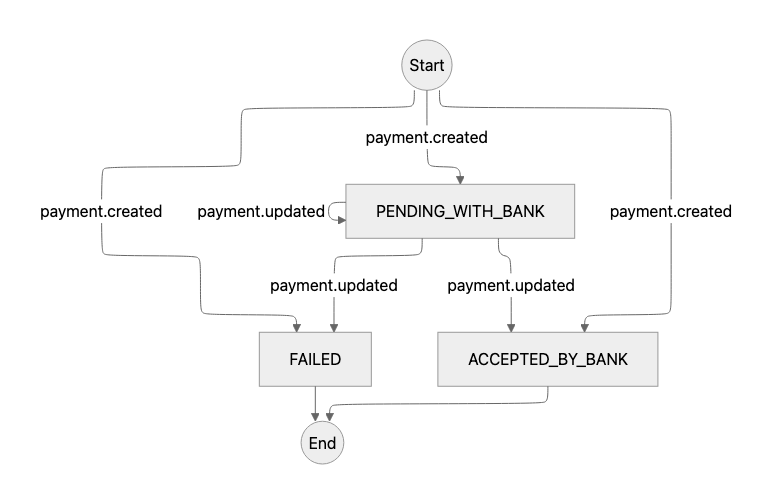
| Status | Definition | Emitted via | UX messaging |
|---|---|---|---|
| FAILED | The bank rejected the payment. Reasons can include insufficient funds, connectivity failure, or account-level controls. Terminal. | payment.created or payment.updated | "Your payment couldn't be completed. Please check your account and try again" |
| PENDING_WITH_BANK | The bank has accepted the initiation request and is processing the transaction, but the payment has not yet been received by the creditor's bank. Lean has not yet received a terminal status from the debtor's bank. In some edge cases, a terminal status may be delayed. In this scenario you should rely on reconciliation to check if funds settled. Intermediate. | payment.created or payment.updated | "Your payment is being processed. We'll notify you once it's been confirmed — this shouldn't take long." |
| ACCEPTED_BY_BANK | The bank accepted the initiation and the funds were successfully sent to the creditor's bank. This should not be treated as a settled payment until funds are reconciled — in rare cases, delays or failures can occur (e.g. additional KYC checks, or insufficient funds after transfer fees). Reconcile funds before making them available to the customer or releasing goods. Terminal. | payment.created or payment.updated | "Your payment was submitted successfully." |
Updated 4 months ago