
Integrating Account-on-file Payments
Overview
To initiate Account-on-file payments, the customer must first authorise a consent with their bank. This authorisation is handled through Lean LinkSDK, which provides a secure, user-friendly interface for reviewing consent details and confirming approval.
Once the consent is authorised, it acts as a long-lived authorisation. Your application can then initiate multiple payments programmatically, within the approved limits, without requiring the customer to re-authorise each payment.
How it works
The Account-on-file payment flow consists of the following steps:
- Create an Account-on-file consent that defines the limits, duration, and scope for future payments.
- Start the consent authorisation flow using Lean LinkSDK.
- The customer selects their bank, reviews the consent details, and authorises the consent.
- Handle the customer returning to your application using preconfigured redirect URLs.
- Use
captureRedirect()to retrieve and display the consent authorisation result screen. - Initiate payments programmatically using server-to-server API calls, within the scope of the authorised consent.
- Listen for consent and payment state changes using webhooks.
Creating consent
Use the Account-on-file API to create a new long-lived consent.
A consent defines the customer, destination account, validity period, and limits that apply to all payments initiated under it. You can control how long the consent remains valid using expiration_date_time. If not specified, consents are valid for up to 12 months by default.
Provide the following identifiers:
customer_idthe customer granting the consent (debtor)destination_account_idfor the intended receiving creditor account. Optionally, you can pass between 2 and 10destination_account_idwhen creating a consent. This lets you route payments made under the authorised consent to different creditor accounts.- Note: Pass the destination IDs for every creditor account you intend to to be able to pay to at the time of consent creation. The list of destinations can't be changed once the consent has been authorised.
- Define payment limits and reset period using
control_parameters.
Understanding Control Parameters
Read more about consent control parameters (limits) in a dedicated section.
curl -L 'https://sandbox.leantech.me/consents/account-on-file' \
-H 'Content-Type: application/json' \
-H 'Authorization: Bearer YOUR_JWT' \
-d '{
    "customer_id": "<your_customer_id>",
    "destination_account_id": "<your_destination_account_id>",
		"expiration_date_time": "2026-09-24T14:15:22Z",
    "currency": "AED",
    "reference": "ACME-ACCOUNT-LINK-2025-001",
    "purpose": "GDS",
    "control_parameters": {
        "period_type": "Day",
        "max_individual_amount": 5000.00
    }
}'
{
"id": "2a4ab530-9e92-4dd4-bfbb-c43a3c4d3207",
"application_id": "43f1eafb-2551-4af5-b7e1-87ca7aa6508c",
"start_date_time": "2025-10-24T14:15:22Z",
"expiration_date_time": "2026-09-24T14:15:22Z",
"customer_id": "26b69ba5-0447-45b6-be7d-376d6b432843",
"status": "AWAITING_AUTHORISATION",
"destination_account_id": "26438bf6-0d33-4f11-a025-a9d5294be012",
"currency": "AED",
"control_parameters": {
"type": "VariableOnDemand",
"period_type": "Day",
"period_start_date": "2025-10-24T14:15:22Z",
"max_individual_amount": 5000.00,
"max_cumulative_amount": null,
"max_cumulative_number_of_payments": null,
"max_cumulative_amount_per_period": null,
"max_cumulative_number_of_payments_per_period": null
},
"purpose": "GDS",
"reference": "ACME-ACCOUNT-LINK-2025-001"
}Persist the returned consent
id. This value is required for all subsequent operations involving the consent, including authorisation, payment initiation and consent management.
Once created, the consent enters the AWAITING_AUTHORISATION state. It remains in this state until the customer completes the authorisation flow using Lean LinkSDK and approves the consent with their bank.
Creating an Account-on-file consent with an immediate payment
Account-on-file consents allow you to attach an optional initial payment during consent creation so that this first payment is automatically initiated the moment the consent is authorised — no separate payment initiation call required for the initial payment.
This is useful for any use case where value must be collected upfront, such as a loan down payment, an initial wallet deposit, or a first installment.
How it works:
- You create the consent and include the immediate payment's details in the same request.
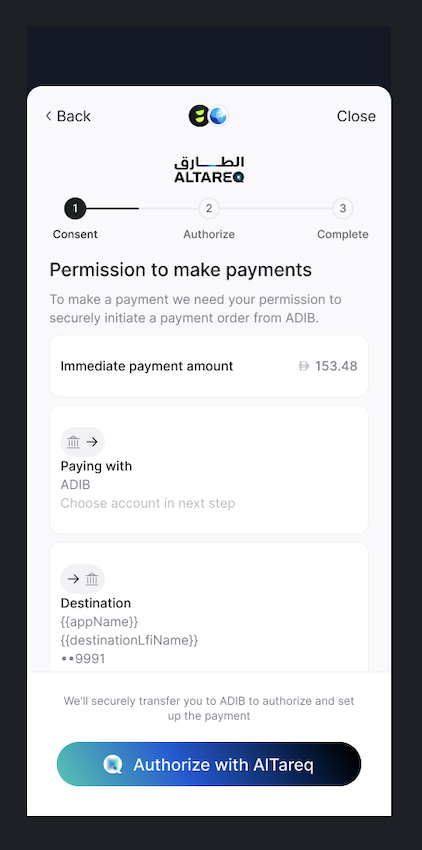
- The end user authorises the consent at their bank via the Lean SDK. Before they are redirected, the SDK displays the immediate payment amount so the user knows what to expect.
- Lean initiates the payment automatically once the consent status moves to authorised. You do not need to make a separate API call.
- The SDK shows the outcome — consent authorisation result and payment status — before returning the user to your application.
- You continue to receive consent and payment webhook events separately.
{
    "customer_id": "{{customer_id}}",
    "destination_account_id": "{{destination_account_id}}",
    "currency": "AED",
    "reference": "ACME-ACCOUNT-LINK-2025-001",
    "start_date_time": "2025-10-24T14:15:22Z",
    "purpose": "GDS",
    "expiration_date_time": "2026-09-24T14:15:22Z",
    "control_parameters": {
        "period_type": "Day",
        "max_individual_amount": 5000.00,
        "max_cumulative_amount": 3000.00,
        "max_cumulative_number_of_payments": 10,
        "max_cumulative_amount_per_period": 2000.00,
        "max_cumulative_number_of_payments_per_period": 11
    },
    "government_identifier": {
        "value": "784-1234-1234-1234",
        "type": "EMIRATES_ID"
    },
    "immediate_payment": {
        "amount": 12.34,
        "reference": "Some Ref"
    }
}
Triggering consent authorisation
Use the LinkSDK authorizeConsent() function, to start the consent authorisation flow.
Pass the consent id returned from the previous step as a consent_id parameter.
LeanV2.authorizeConsent({
    sandbox: true,
    app_token: "<your_application_id>",
    consent_id: "<your_consent_id>>",
    bank_identifier: "_OF_UAE",
    account_id: "optional_account_id",
    success_redirect_url: "<url_to_redirect_on_success>",
    fail_redirect_url: "<url_to_redirect_on_failure>",
    access_token: "<customer_scoped_access_token>",
    risk_details: {} // omitted for brevity
})Risk Details Collection
Open Finance regulations require the collection of risk-related metadata to help prevent fraud. The
risk_detailsobject allows you to provide this information. See Risk Details for more information.
Bank selection, consent details and redirection
In the consent authorisation process, LinkSDK guides the customer through:
- Selecting their bank
- Reviewing consent details and limits
- Redirecting to their bank to authorise the consent
These steps are fully handled by LinkSDK and use CBUAE certified customer-facing screens.
Preselect the user's account and skip bank selection
Pass
sender_account_idintoauthoriseConsent()to preselect the user's account and skip bank selection, when (1) the user has an active payment source and (2) theircustomer_idis on the feature flag for that bank's Open Finance connection.
- Migrating users: legacy (reverse-engineering) payment sources can be migrated to Open Finance under the same two conditions.
- New users: Lean creates a payment source per unique bank/account a user pays from. The
sender_account_idarrives on AoF consent-status webhooks and can also be fetched from/consents/v1.
Screen Customisation
Due to Open Finance regulations, customer-facing screens in payment flow, must be certified by Nebras and offer limited customisation.
In the SDK only control parameters (limits) where values are passed by the client at consent creation will be shown to the user
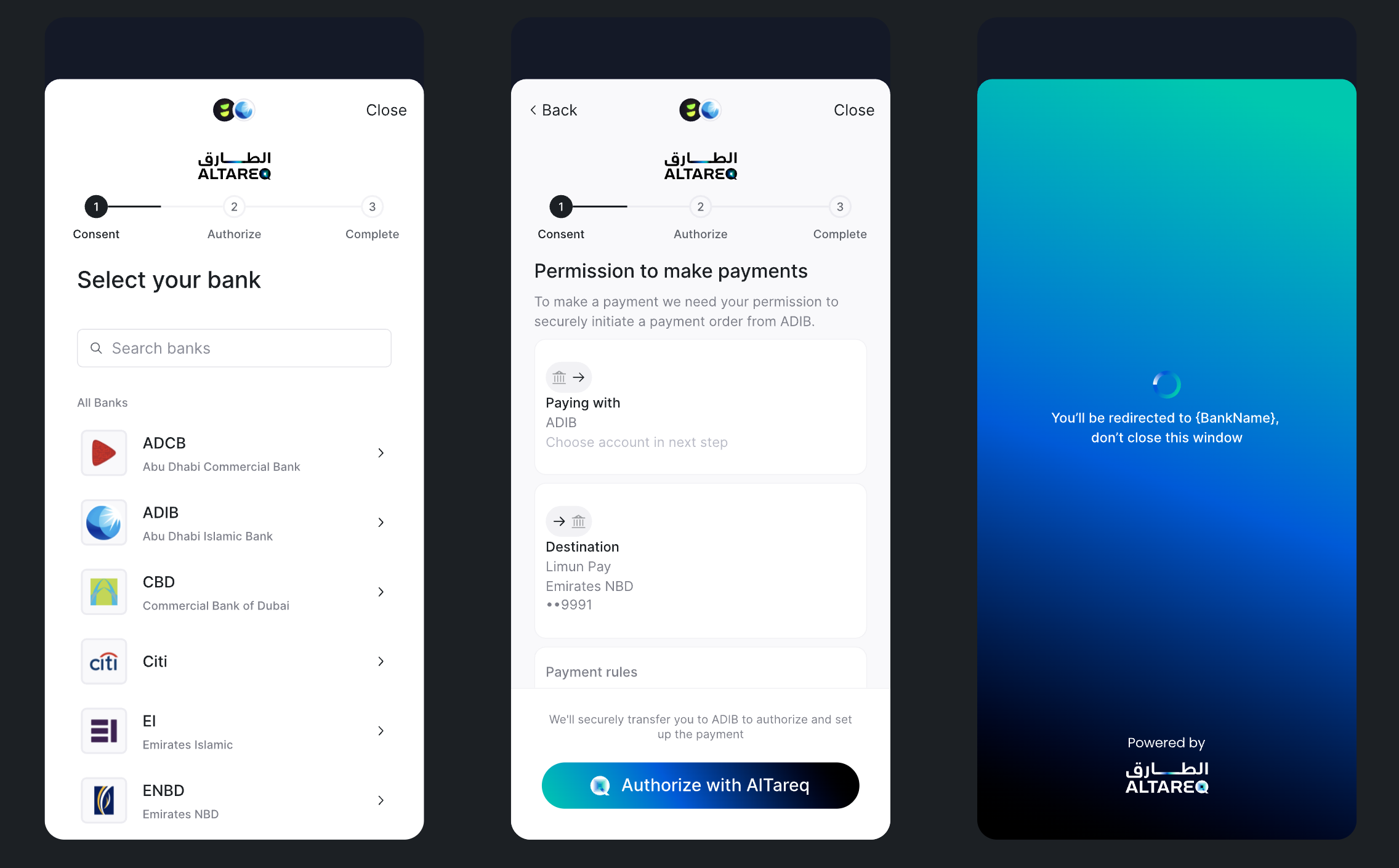
Consent authorisation flow
During the authorisation the customer is being handed over from your application to the bank where they can perform consent authorisation. The customer will return to your application through a redirect URL passed as a parameter to the authorizeConsent function.
Using custom bank selection
Use Create your own bank list guide, if you want to provide a custom banks selection screen. Pass resulting
bank_identifierto theauthorizeConsentfunction to skip the default bank selection.
After successful authorisation, the consent transitions to the AUTHORISED state and can be used to initiate payments within the defined control parameters.
Use consent.status.updated webhook to receive asynchronous notifications about consent state
Account-on-file with immediate payment consent details
The end user completes the consent authorization flow in the Lean SDK. The SDK displays the immediate payment amount before bank redirect and on the capture redirect screen. No API call is required from you at this step.
Successful consent authorisation with pending immediate payment flow e2e flow UX example:
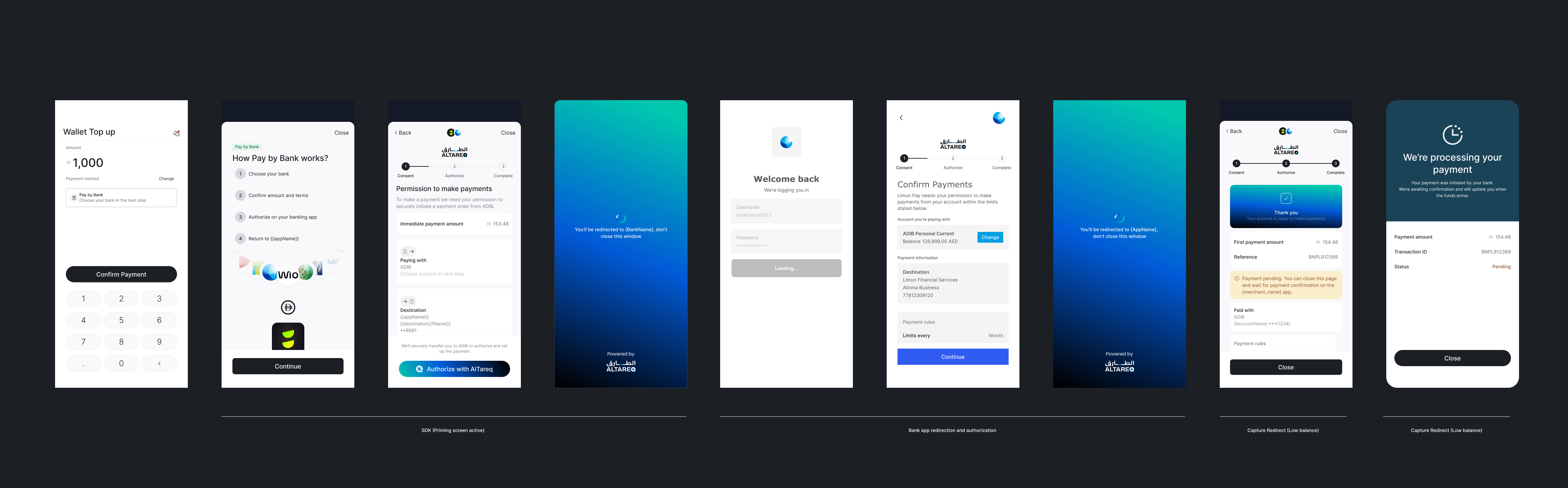
Lean polls for the immediate payment status for 10 seconds and surfaces the result to the end user. If the payment is still pending after this window, the end user is prompted to close the SDK and return to your app. Listen for the payment.updated webhook for the final status and notify the end user accordingly.
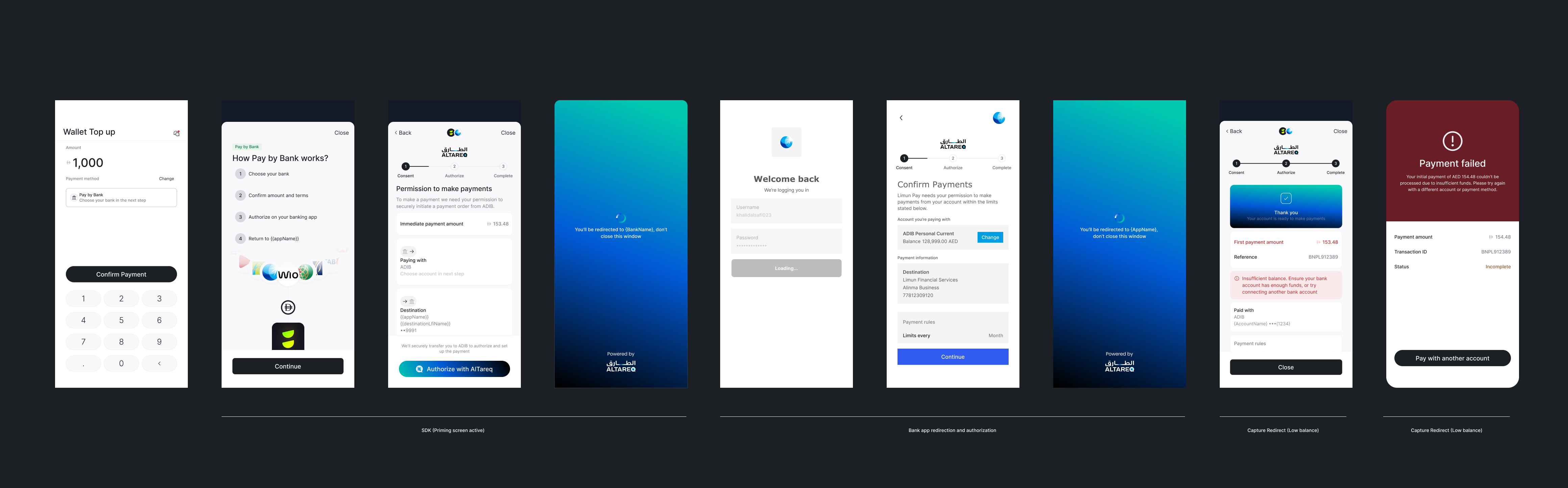
Successful consent authorisation with failed immediate payment flow e2e flow UX example:
Account-on-file with immediate payment payment consent screen in SDK:

Capturing redirects and displaying the authorisation result page
After the authorisation flow completes, Lean redirects the customer back to your configured redirect URL, appending query parameters that describe the consent outcome. Capture redirect renders immediately, it does not require a loading screen.
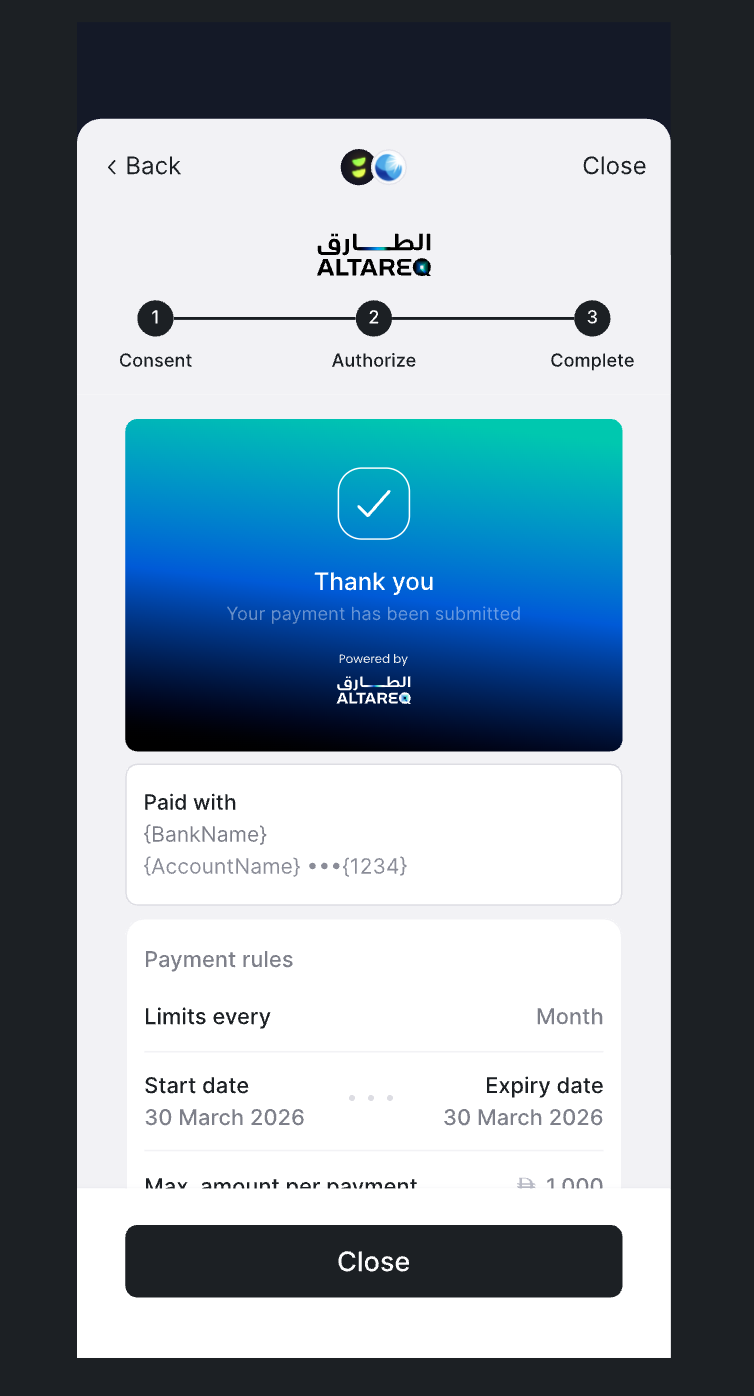
Capture Redirect Screen
Note: the success and failure redirect URLs passed into the Dev Portal are not called directly by CaptureRedirect() — they simply route the end user to your pre-built outcome screens. Use CaptureRedirect() SDK function to build those pages on the route in the URLs and ensure they can handle all parameters Lean passes in the redirect URL.
When an immediate payment has been passed with Account-on-file consent the capture redirect screen will display two clear outcomes to the user:
- the outcome of the consent authorization
- the outcome of the immediate payment initiated based on the status of the payment
Capture redirect for AoF and immediate payment when consent and payment is successful:
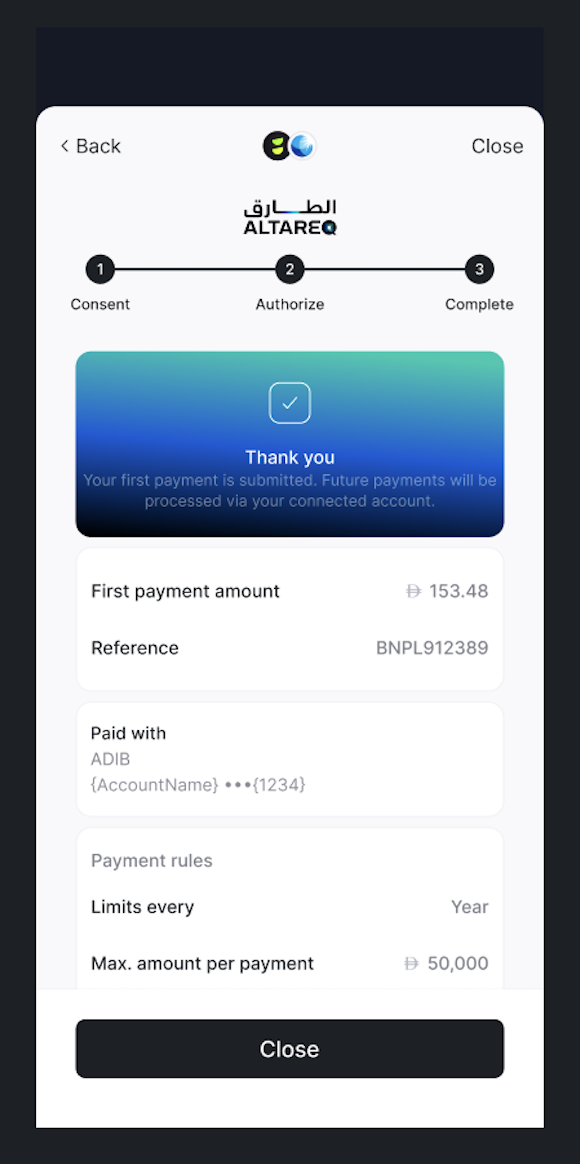
Capture redirect with successful consent authorization and successful payment
Capture redirect for AoF and immediate payment when consent is successful but payment fails:
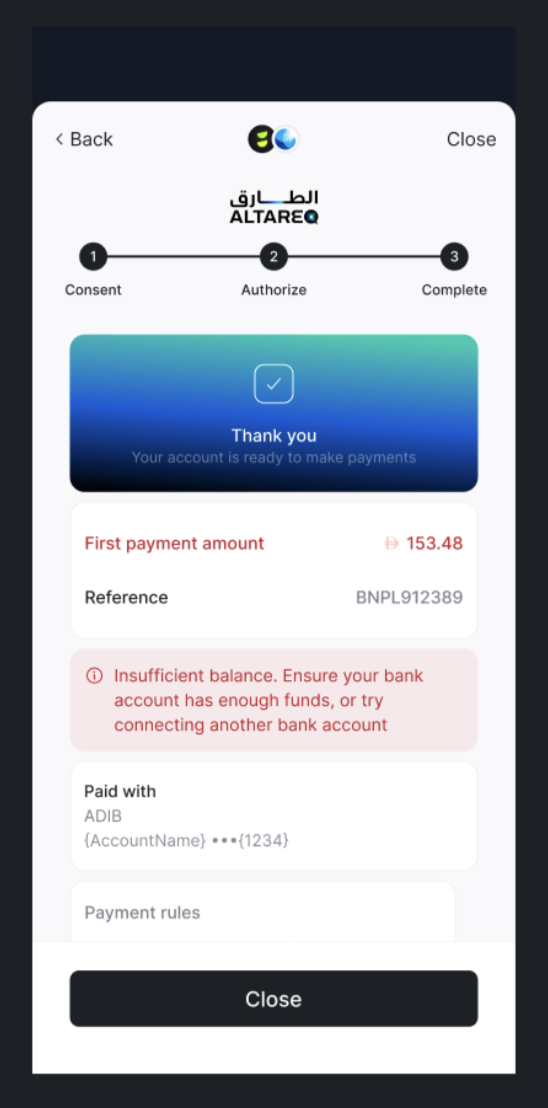
Capture redirect with successful consent authorization and failed payment
If the AoF consent is successfully authorised, Lean immediately uses the resulting consent ID to initiate the payment. If authorisation fails, no payment is attempted. In rare cases the consent can be authorised but the payment still rejected (e.g. insufficient funds). Clients must ensure they listen for Consent and Payment outcomes that are emitted via separate webhook events.
To display the final result screen, call captureRedirect() and pass all the parameters received in the redirect:
LeanSDK.captureRedirect({
    app_token: "<your_app_id>",
    bank_identifier: "<from_query_param>",
    consent_id:"<from_query_param>",
    consent_attempt_id: "<from_query_param>",
    customer_id: "<from_query_param>",
    granular_status_code: "<from_query_param>",
    status_additional_info: "<from_query_param>",
    sandbox: true,
    access_token: "<customer_scoped_access_token>"
})
Initiating a payment
Once a consent is authorised, your backend can initiate payments on behalf of the customer using the Account on File API.
Idempotency
The API uses the Idempotency-Key header to ensure that payment initiation requests are processed exactly once. Use a unique key for each intended payment.
If the same request is retried with the same Idempotency-Key, Lean does not create a duplicate. Instead, the API returns the payment resource generated during the initial request.
curl -L 'https://sandbox.leantech.me/payments/account-on-file' \
-H 'idempotency-key: KG5LxwFBepaKHyUD' \
-H 'Content-Type: application/json' \
-H 'Authorization: Bearer YOUR_JWT' \
-d '{
    "consent_id": "2a4ab530-9e92-4dd4-bfbb-c43a3c4d3207",
    "amount": 130.52,
    "purpose": "FIS",
    "reference": "ACME-ACCOUNT-LINK-2025-001",
    "creditor_reference": "INV-2025-004321",
    "risk_details": {}
}'
{
"id": "341c3308-408d-48d9-ae44-c98eb1aa9a6f",
"status": "CREATED",
"consent_id": "123e4567-e89b-12d3-a456-426655440000",
"amount": {
"currency": "AED",
"value": 130.52
},
"reference": "ACME-ACCOUNT-LINK-2025-001"
}Lean recommends implementing step-up authentication (such as an email or SMS OTP) at the point of payment to confirm the end user's presence and protect against unauthorised transactions.
Each payment must reference an authorised consent_id and comply with the limits defined in the consent's control parameters. Payment initiation is performed server-to-server using your API credentials and does not have to involve any customer interaction.
Listening to state changes
Lean emits webhook events for both consent and payment state changes.
- consent.status.updated is sent for subsequent status updates.
- payment.created is sent when a payment request is created with the bank.
- payment.updated is sent for subsequent payment state updates.
{
  "type": "payment.created",
  "payload": {
    "id": "f672849b-b4f1-46b1-99cd-80e0bd24c6c0",
    "customer_id": "CUSTOMER_ID_RELATED_TO_PAYMENT",
    "intent_id": "INTENT_ID_RELATED_TO_PAYMENT",
    "status": "PENDING_WITH_BANK",
    "amount": 12.34,
    "currency": "AED",
    "payment_destination_id": "DESTINATION_ID_RELATED_TO_PAYMENT"
  },
  "message": "A payment object has been created.",
  "timestamp": "2025-12-17T13:59:32.008767568Z",
  "event_id": "7d1e3de6-fb8b-4480-8652-903c75b8b8c8"
}
{
"type": "payment.updated",
"payload": {
"id": "f672849b-b4f1-46b1-99cd-80e0bd24c6c0",
"customer_id": "CUSTOMER_ID_RELATED_TO_PAYMENT",
"intent_id": "INTENT_ID_RELATED_TO_PAYMENT",
"status": "PENDING_WITH_BANK",
"amount": 12.34,
"currency": "AED",
"bank_transaction_reference": "528b2b3c-128a-4b51-b50e-31cfc6d7e01b",
"payment_destination_id": "DESTINATION_ID_RELATED_TO_PAYMENT"
},
"message": "A payment object has been updated.",
"timestamp": "2025-12-17T14:00:00.731572845Z",
"event_id": "bb93b16a-f1cd-486d-887e-b63492b4ebdd"
}{
"event_id": "cce42859-055b-4271-b4c0-b94d54a3b894",
"type": "consent.status.updated",
"message": "A payment consent has been updated.",
"timestamp": "2025-10-07T10:32:39.691593783Z",
"payload": {
"id": "f8668fb8-62fa-4dae-b8a6-ac6a5d5a88eb",
"status": "SUSPENDED",
"customer_id": "69b33353-79f8-42ca-9bfe-a3d742cc353c",
"account_id": "69b33353-79f8-42ca-9bfe-a3d742cc353c",
"consent_type": "PAYMENT",
"application_id": "69b33353-79f8-42ca-9bfe-a3d742cc353c",
"updated_at": "2025-10-07T14:17:34.342847Z",
}
}Configure webhook subscriptions in the Webhooks section of the Application Dashboard.
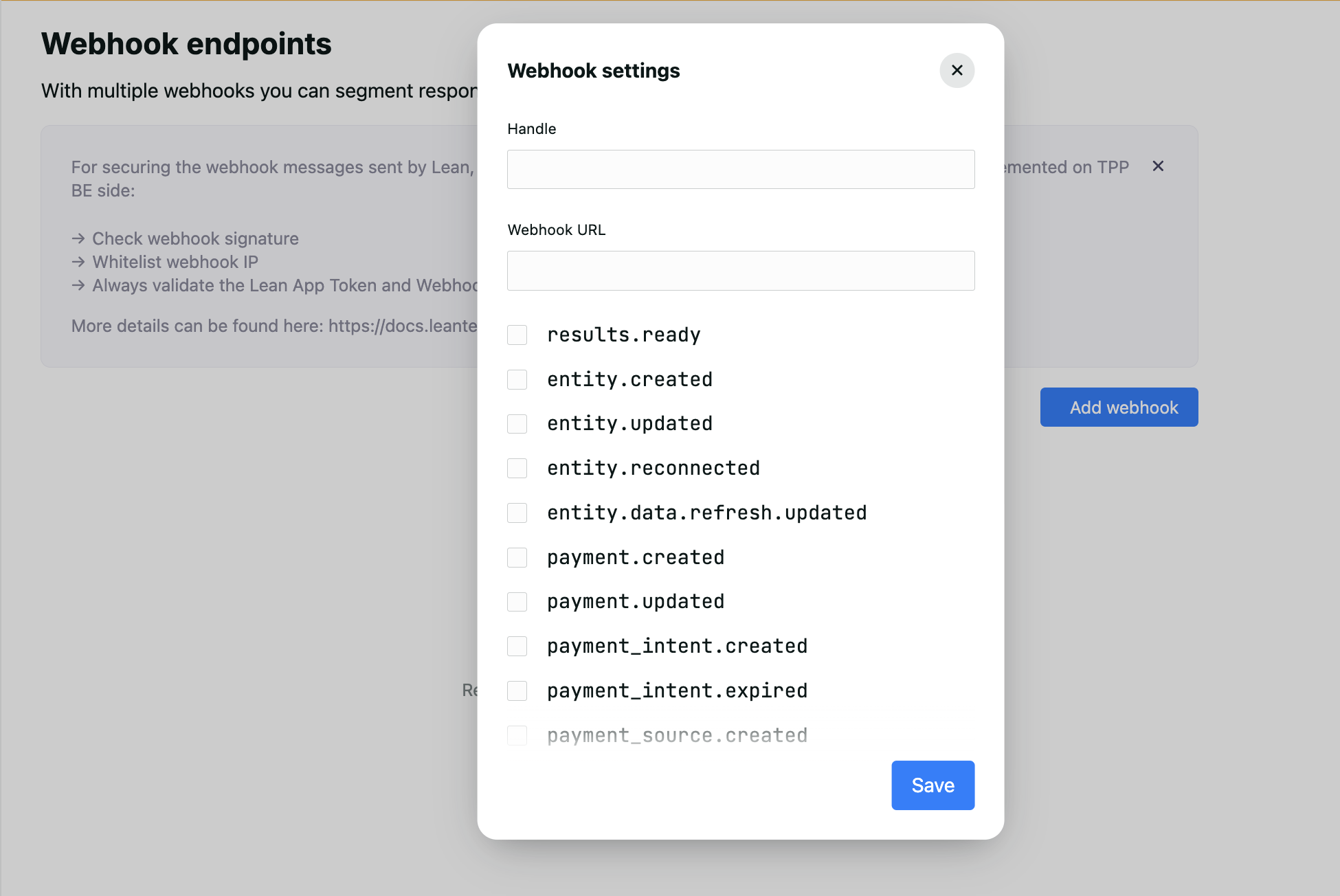
Webhooks panel in Application Dashboard
Updated 6 days ago