
Open Finance Enablement for Existing Integrations
If you are an existing Lean client today consuming Lean's legacy Payments API solution, this guide explains the steps you need to take to enable your integration with Open Finance based payments.
Note, the scope of this guide only relates retail payments (C2M) and what you need to do to enable from Lean's Open Finance native 'Single Instant Payments' along side legacy RE payments using your existing intergration.
Whats changing
Overview
- You will continue to use the same APIs and endpoints—but Lean will now power them through Open Finance API connectivity directly with banks, not legacy bank connections.
- You benefit from API-first, regulatory-mandated Open Finance infrastructure, replacing older wrap-around integrations.
- Your users get a faster, cleaner, fully guided payment journey — no manual inputs, no OTP detours, no “cool-off” delays.
- You gain real-time payment lifecycle visibility through richer status events delivered via webhook.
- A few new backend fields will be required to meet Open Finance standards (clearly documented in the enablement guide).
- A few new SDK functions are introduced to support consent, authentication, and redirect handling, along with some onboarding details to be shared in the DevPortal.
Enabling Open Finance Single instant payments will deliver your users a faster, fully automated end-to-end payment experience with fewer steps and less friction using native smartphone and desktop journeys with smooth app-to-app redirection.
Lean supports a hybrid connectivity model: Open Finance for banks that are live, and RE connections for banks that are not yet live. Banks are progressively transitioned as they become production-ready and regulator-approved, ensuring continuous and broad bank coverage.
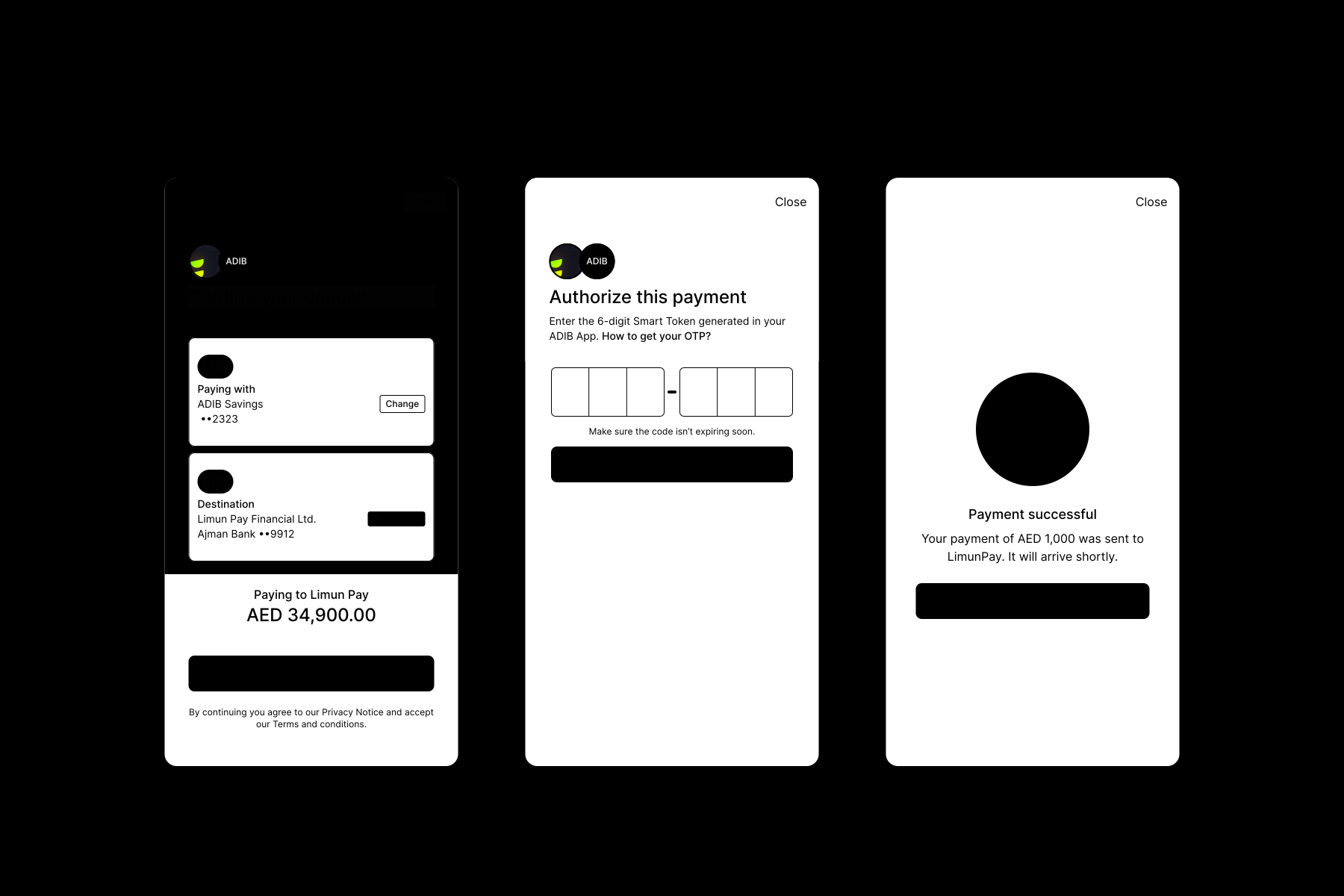
Legacy payments user flow
Single Instant Payments user flow (Open Finance)
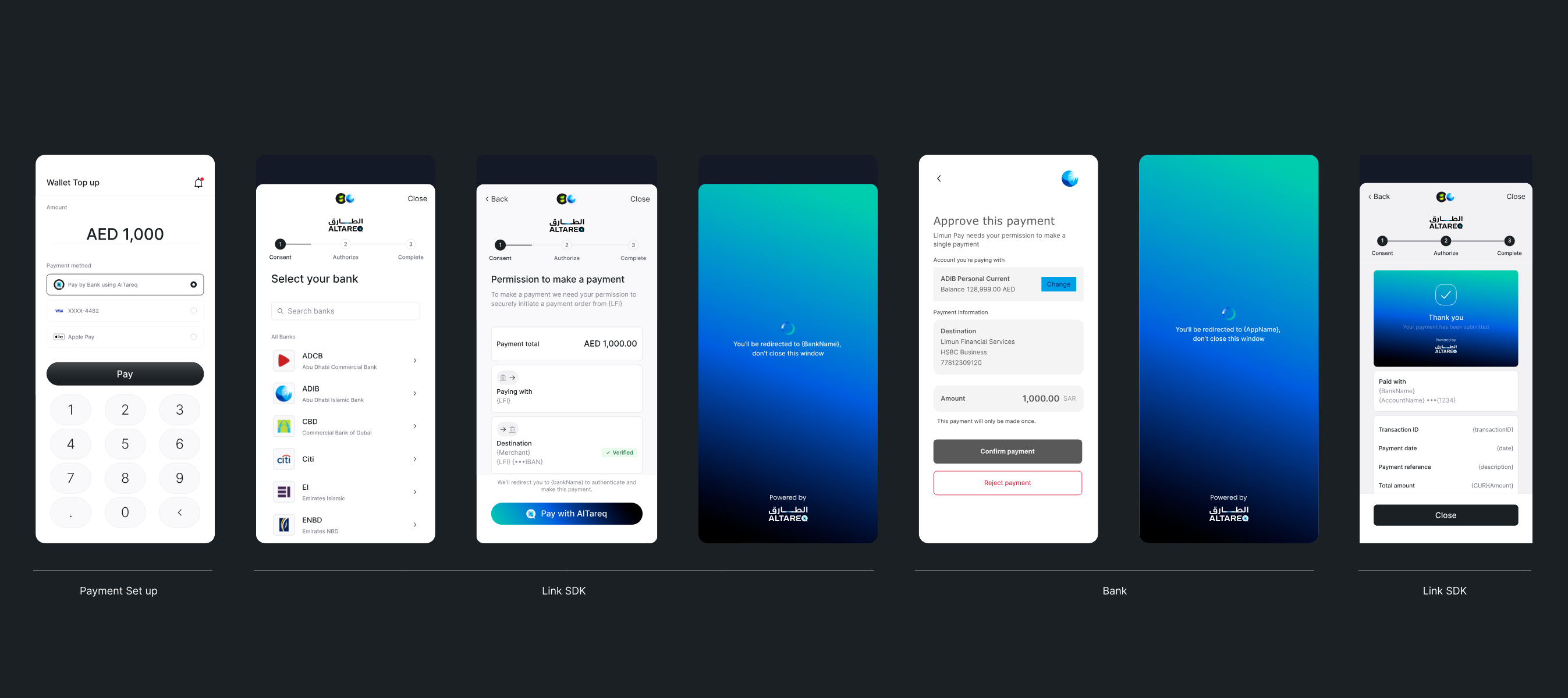
Note, the 'Al Tareq' branding in the Open Finance flow is mandatory for all Open Finance based payments. It is a regulator driven brand initiative designed to foster end user trust and awareness
What you need to do
1. Configuration
Consent copy of purpose and benefit statements
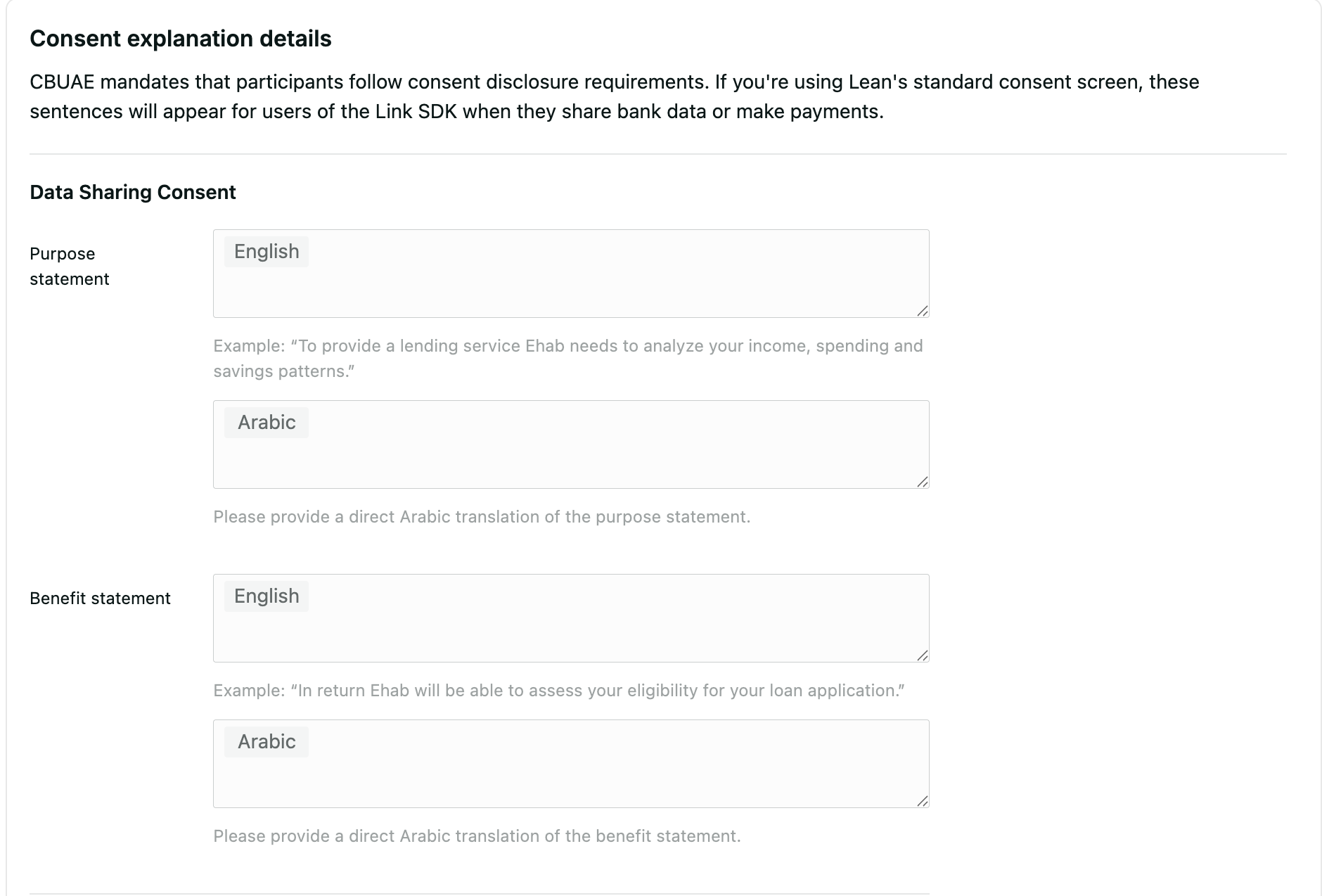
Open Finance requires you to keep your customers informed about the purpose of the payment and the reason for engagement. You can use the Settings tab in the Lean Developer Portal to configure the following items, in both English and Arabic:
- Purpose statement for both data and payment consents
- Benefit statement for both data and payment consents
Redirect Urls
The Open Finance payment flow differs from the existing one. After the customer completes authentication and payment authorisation at their bank, Lean will redirect the user to the predefined URL provided during payment initiation. For security reasons, this URL must be preconfigured in the Settings tab of the Lean Developer Portal.
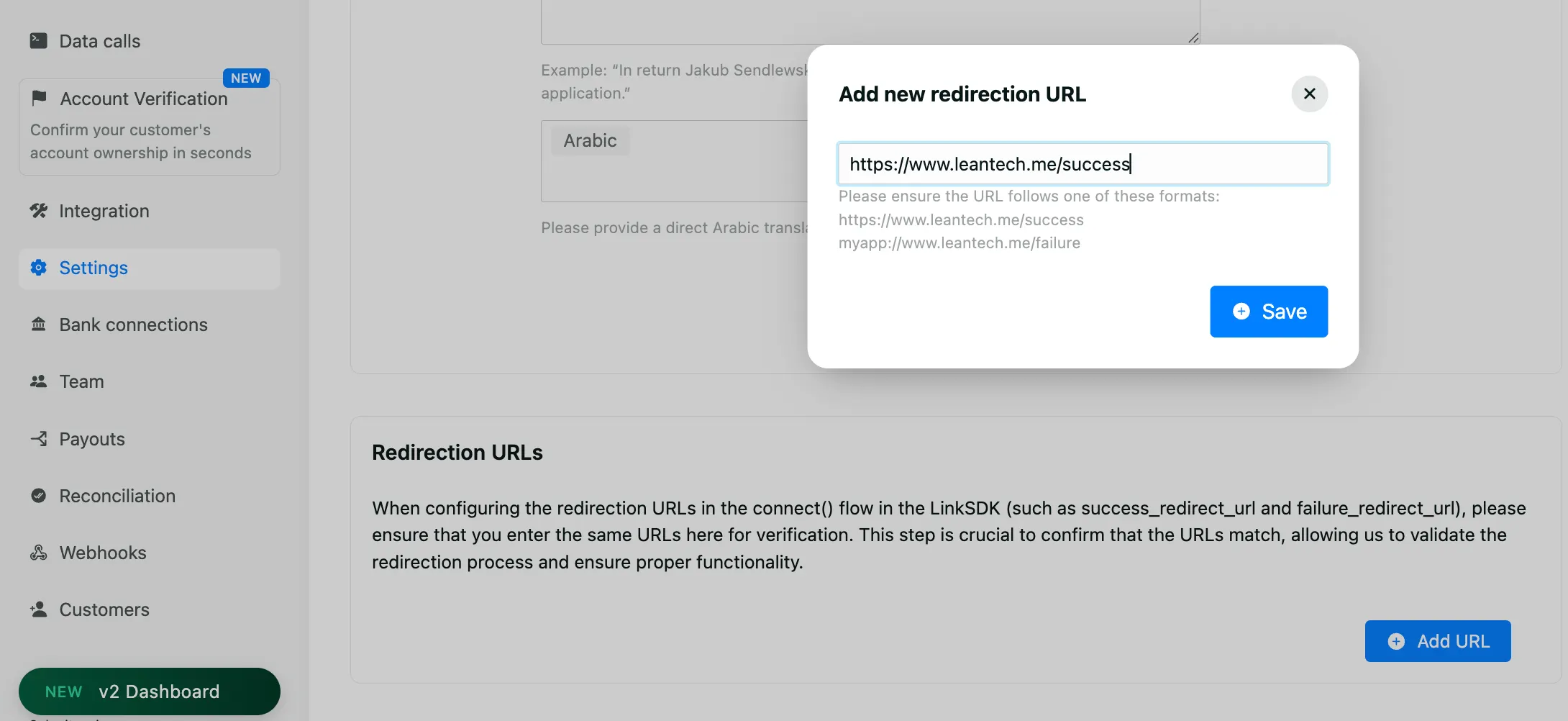
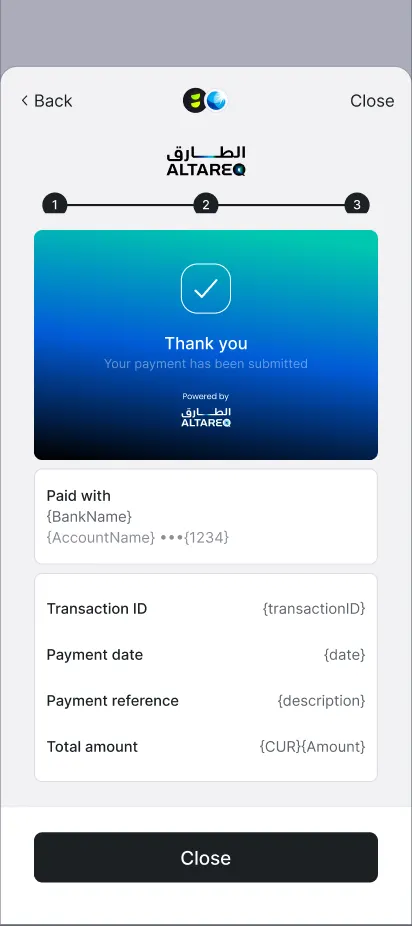
The redirect URL should display the payment result screen provided by the Lean SDK’s captureRedirect function.
Payment Purpose
Open Finance payments place a strong emphasis on customer awareness. Therefore, each payment is required to have an assigned Purpose Code, which is displayed to the user. The Purpose Code represents the payment category the payment falls under, for example: RNT – Rent Payments.
You can provide a purpose_code per payment basis, in the Create Intent request.
curl -X POST 'https://sandbox.leantech.me/payments/v1/intents' \
  --header 'Content-Type: application/json' \
  --header 'Authorization: Bearer YOUR_JWT' \
  --data-raw '{
    "amount": 1000.50,
    "currency": "AED",
    "payment_destination_id": "DESTINATION_ID",
    "customer_id": "CUSTOMER_ID",
    "description": "YOUR_TRANSACTION_REFERENCE",
    "purpose_code": "RNT"
}'Alternatively, you can provide a common, global payment purpose via email or the designated Slack channel, and Lean will configure it for you.
The full list of payment purpose codes we support today include:
FIS- Financial servicesTCS- Telecommunication servicesMWP- Mobile wallet card paymentsOAT- Own account transferIFS- Information ServicesRNT- Rent paymentsLNC- Loan chargesPIN- Personal investmentsGDS- Goods bought or sold
2. Updating Destination
Each destination must be tied to your merchant identity and include your trade license number (or an equivalent government identifier) as well as the corresponding bank type of the account.
Lean currently supports Trade License Number for Destination government identifier; and Retail, SME and Corporate bank account types.
You can provide data either by creating a new destination using payments/v1/destinations endpoint.
curl -L 'https://sandbox.leantech.me/payments/v1/destinations' \
-H 'Content-Type: application/json' \
-H 'Authorization: Bearer YOUR_JWT' \
-d '{
	"name": "EGroceries Trading LLC",
	"display_name": "Merchant Settlement Account",
	"address": "11 Corniche Rd W",
	"city": "Abu Dhabi",
	"country": "ARE",
	"iban": "AE070331234567890123456",
	"swift_code": "ADCBAEAAXXX",
	"bank_type": "RETAIL" | "SME" | "CORPORATE",
	"government_identifier": {
		"type": "TRADE_LICENSE_NUMBER",
		"value": "XX-1234567"
	}
}'You can also share the details with Lean via email or Slack and we will update them for you.
3. SDK
Note: An update for your app is required for end-users to interact with the OF-enabled bank, and a force update is strongly recommended to make sure the new SDK parameters are configured.
Connect Flow
To support the Open Finance and legacy RE payment flows, Lean requires you to pass the redirect URLs configured in the previous steps into the SDK’s connect function and ensure that payment permissions are enabled. The full list of arguments would look as follows:
Payment Only
.connect({
  app_token: "YOUR_APP_TOKEN",
  access_token: "<customer_access_token>",
  customer_id: "CUSTOMER_ID",
  permissions: [ "payments" ],
  sandbox: true,
  fail_redirect_url: "https://leantech.me/failure",
  success_redirect_url: "https://leantech.me/success",
  account_type: "BUSINESS" | "PERSONAL"
})
or, alternatively, if you require both account access and payments e.g.
Account access + Payment
The guide about fetching bank data is here
.connect({
  app_token: "YOUR_APP_TOKEN",
  access_token: "<customer_access_token>",
  customer_id: "CUSTOMER_ID",
  permissions: [
    "identity", "accounts", "balance", "transactions", "identities",
    "scheduled_payments", "standing_orders", "direct_debits",
    "beneficiaries", "payments"
  ],
  sandbox: true,
  fail_redirect_url: "https://leantech.me/failure",
  success_redirect_url: "https://leantech.me/success",
  account_type: "BUSINESS" | "PERSONAL",
  access_from: "2026-01-05T00:00:00+4:00",
  access_to: "2026-01-07T00:00:00+4:00"
})
Account ownership verification + Payment
.connect({
  app_token: "YOUR_APP_TOKEN",
  access_token: "<customer_access_token>",
  customer_id: "CUSTOMER_ID",
  permissions: [
    "identity", "accounts", "payments"
  ],
  sandbox: true,
  fail_redirect_url: "https://leantech.me/failure",
  success_redirect_url: "https://leantech.me/success",
  account_type: "BUSINESS" | "PERSONAL",
	access_from: "2026-01-05T00:00:00+4:00",
  access_to: "2026-01-07T00:00:00+4:00"
})Using the data returned in this flow, the client can use Lean’s verification APIs to verify that your customer owns the bank account. For name verification use can use this endpoint and for the IBAN ownership verification you can you this endpoint. We recommend setting
access_ valueto 48 hrs later fromaccess_from
If you only want to allow your customers to pay from accounts that have been verified, we suggest that you only show accounts to them where the data (e.g. name and/or IBAN) matches with your records.
If you are using GET payment sources as part of your Open Finance migration, always call the endpoint dynamically rather than relying on cached data. This ensures RE payment sources (connected accounts) display correctly in the event of a rollback from OF to RE.
Pay Flow
Changes to the pay function reflect the changes made to connect. Ensure that the correct redirect URLs are passed. The call should look similar to the following example:
Lean.pay({
    app_token: "<your_application_id>",
    payment_intent_id: "<payment_intent_id>",
    sandbox: true,
	  fail_redirect_url: "https://leantech.me/failure",
	  success_redirect_url: "https://leantech.me/success"
});
For banks that are enabled on Open Finance and depending on your use case and integration preference, you can substitute the connect and pay SDK functions and use Lean’s new Open Finance native checkout SDK function instead.
LeanV2.checkout({
	sandbox: true,
	app_token: "<your_application_id>",
	payment_intent_id: "<payment_intent_id>",
	success_redirect_url: "<url_to_redirect_on_success>",
	fail_redirect_url: "<url_to_redirect_on_failure>",
	access_token: "<customer_scoped_access_token>"
})Ensure checkout() is triggered only when bank object, in get List Banks API has connection_type value is
OPEN_BANKING- checkout() will not display banks on legacy RE connections
Capturing Redirect
After the authorisation flow completes, Lean redirects the customer to the configured redirect URL, appending a set of query parameters that describe the outcome of the attempt. These parameters include identifiers that your application can use to verify and persist the result.
To present the final authorisation result to the customer, call the captureRedirect() function provided by the Lean Link SDK and pass the parameters received in the redirect.
Lean.captureRedirect({
    app_token: "<your_app_id>",
    bank_identifier: "<from_query_param>",
    consent_attempt_id: "<from_query_param>",
    customer_id: "<from_query_param>",
    granular_status_code: "<from_query_param>",
    status_additional_info: "<from_query_param>",
    sandbox: true,
    access_token: "<customer_scoped_access_token>"
})
This should result in a screen similar to
4. Handling Webhooks
Open finance based payments use two separate webhooks to notify you about the change in your payment state. First one is the familiar payment.created which represents creation of payment request with the bank. Second is payment.updated that will carry any subsequent status notification.
Note that depending on the bank, you might already receive a final status inside
payment.createdwebhook.
Payment Created Webhook
{
  "type": "payment.created",
  "payload": {
    "id": "f672849b-b4f1-46b1-99cd-80e0bd24c6c0",
    "customer_id": "CUSTOMER_ID_RELATED_TO_PAYMENT",
    "intent_id": "INTENT_ID_RELATED_TO_PAYMENT",
    "status": "PENDING_WITH_BANK",
    "amount": 12.34,
    "currency": "AED",
    "payment_destination_id": "DESTINATION_ID_RELATED_TO_PAYMENT"
  },
  "message": "A payment object has been created.",
  "timestamp": "2025-12-17T13:59:32.008767568Z",
  "event_id": "7d1e3de6-fb8b-4480-8652-903c75b8b8c8"
}For Guaranteed Payments,
payment.createdis the only webhook sent. Thepayment.createdwebhook will carry one of these final statuses:PENDING_WITH_BANK,ACCEPTED_BY_BANK, orFAILED. Note thatpayment.updatedremains relevant only for outgoing transfers.
Payment Updated Webhook
{
  "type": "payment.updated",
  "payload": {
    "id": "f672849b-b4f1-46b1-99cd-80e0bd24c6c0",
    "customer_id": "CUSTOMER_ID_RELATED_TO_PAYMENT",
    "intent_id": "INTENT_ID_RELATED_TO_PAYMENT",
    "status": "PENDING_WITH_BANK",
    "amount": 12.34,
    "currency": "AED",
    "bank_transaction_reference": "528b2b3c-128a-4b51-b50e-31cfc6d7e01b",
    "payment_destination_id": "DESTINATION_ID_RELATED_TO_PAYMENT"
  },
  "message": "A payment object has been updated.",
  "timestamp": "2025-12-17T14:00:00.731572845Z",
  "event_id": "bb93b16a-f1cd-486d-887e-b63492b4ebdd"
}
5. Beneficiary Cooldown Period
With Open Finance payments there’s no longer any beneficiary cooldown period, therefore there’s no need to listen to payment_source.beneficiary.updated . However, it is advised to maintain this functionality while Lean transitions bank connectivity from RE to Open Finance, for the sake of a smooth fallback.
6. Displaying Single Instant Payment history to users
Open Finance regulation requires that you provide your users viewing access to their full historic Single Instant Payment history. You must use Lean's consent management interface by embedding the manageConsents() SDK function in your application and allow users to access the interface to view their payment history at anytime.
The
manageConsents()UI screens are regulated and approved by Nebras, the Open Finance regulatory body. Use of Lean's consent management interface is mandatory to remain compliant.
To render the Single Instant Payment history to you your end user only pass consent_type=payment_history into manageConsents() SDK. Read the Consent Management page for more details.
7. Combining Payments and Data Access
These patterns represent current best practices. Future Lean releases will reduce complexity around use cases that combine data access with payments
Payments and Data access operate as separate permission scopes, each requiring distinct user authorizations:
Supporting Single instant payments and Data access would the follow this pattern:
- Data access would be granted via Data access consent flow requiring bank app authorisation
- Payment would be Initiated separately via SIP consent flow also requiring bank app authorization
- User experience: Two separate bank authorisations (two SCA events), unless temporally separated in your UX flow (e.g., data consent during onboarding, payment consent during deposit)
For complete implementation details for Open Finance Data access flows see the Data API migration guide
8. UX/UI guidelines
UX handling for end user's with legacy connected accounts
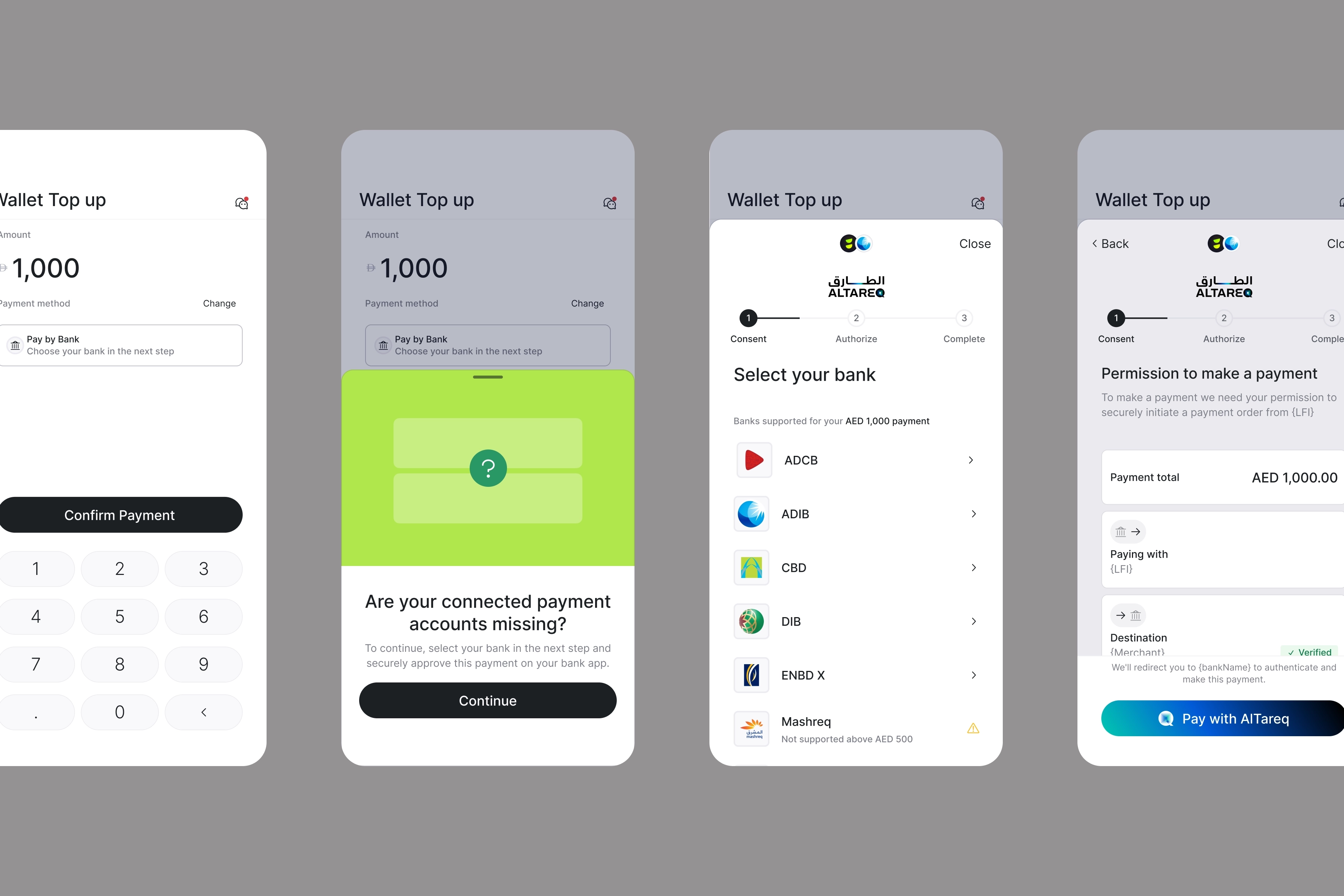
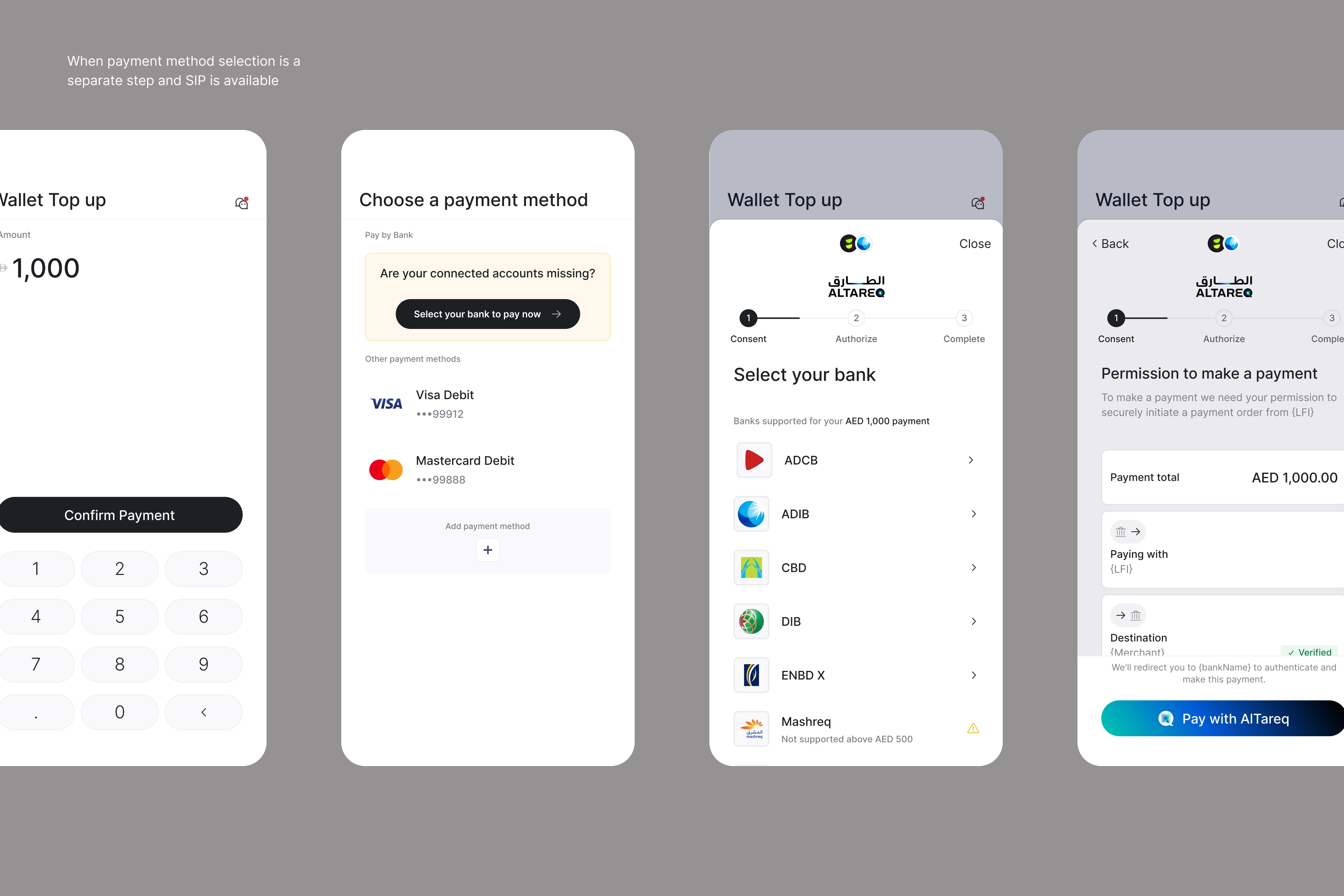
- If you persist your customer's payment sources, you should use the customer's existing payment source data (Bank name and IBAN) from the legacy connected account to label and preselect Pay by bank with the bank name and IBAN as their preferred payment method in your payment screen to provide continuity from the end user perspective. You combine this with messaging that:
- Communicates that the payment flow has been improved and made more secure
- Explains that the user will now be redirected to their bank app to authorise payment each time
- Makes clear that the user will need to go through a new flow to complete their next payment
- If you do not persist your customer's payment sources, ask your SE for a list of your customer's existing payment sources or fetch from the Get Payment Sources endpoint
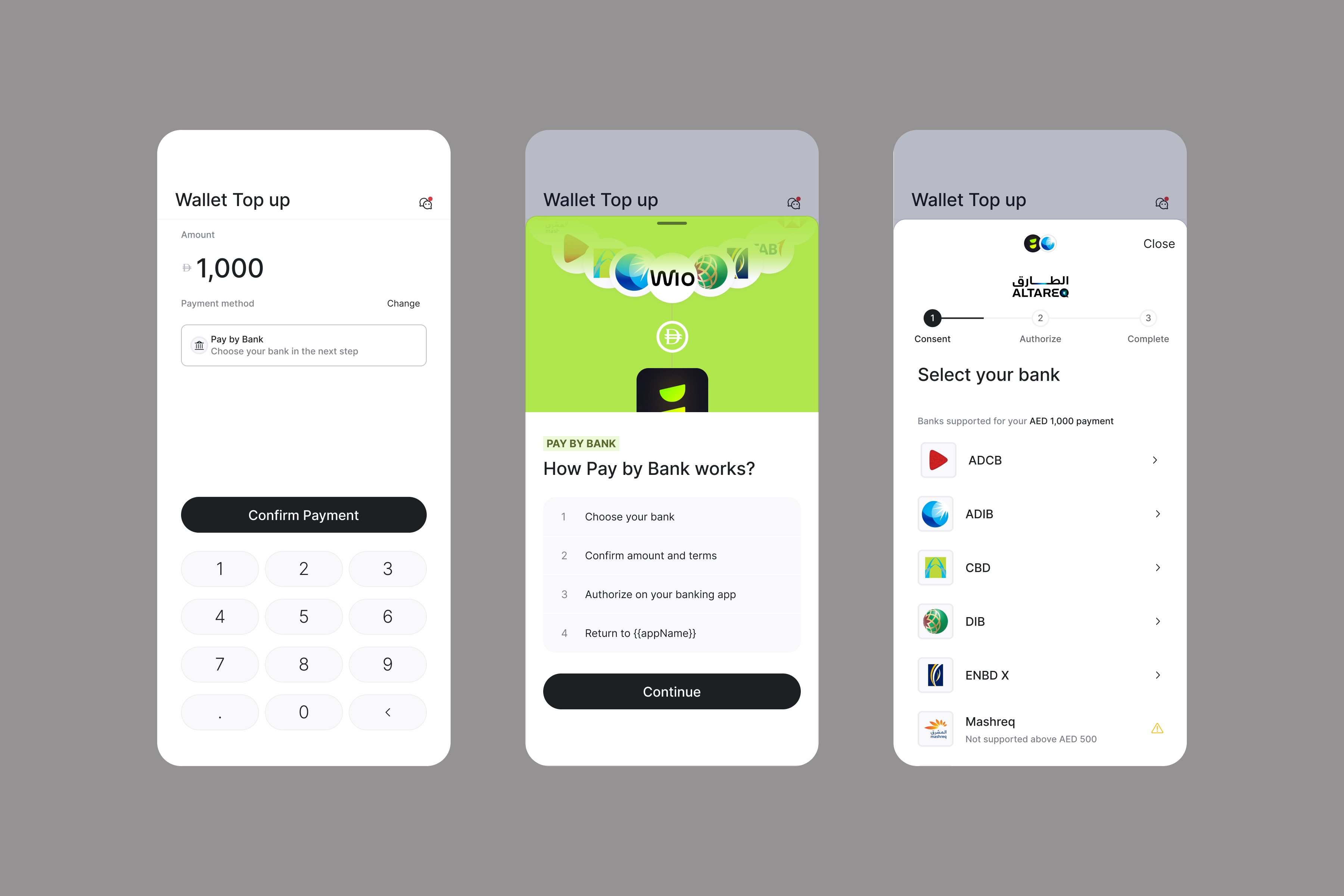
Here is a ideal UX priming example if you are using Single Instant payments solution:
Alternatively, if you have a separate payment method screen you can use this UX priming example:
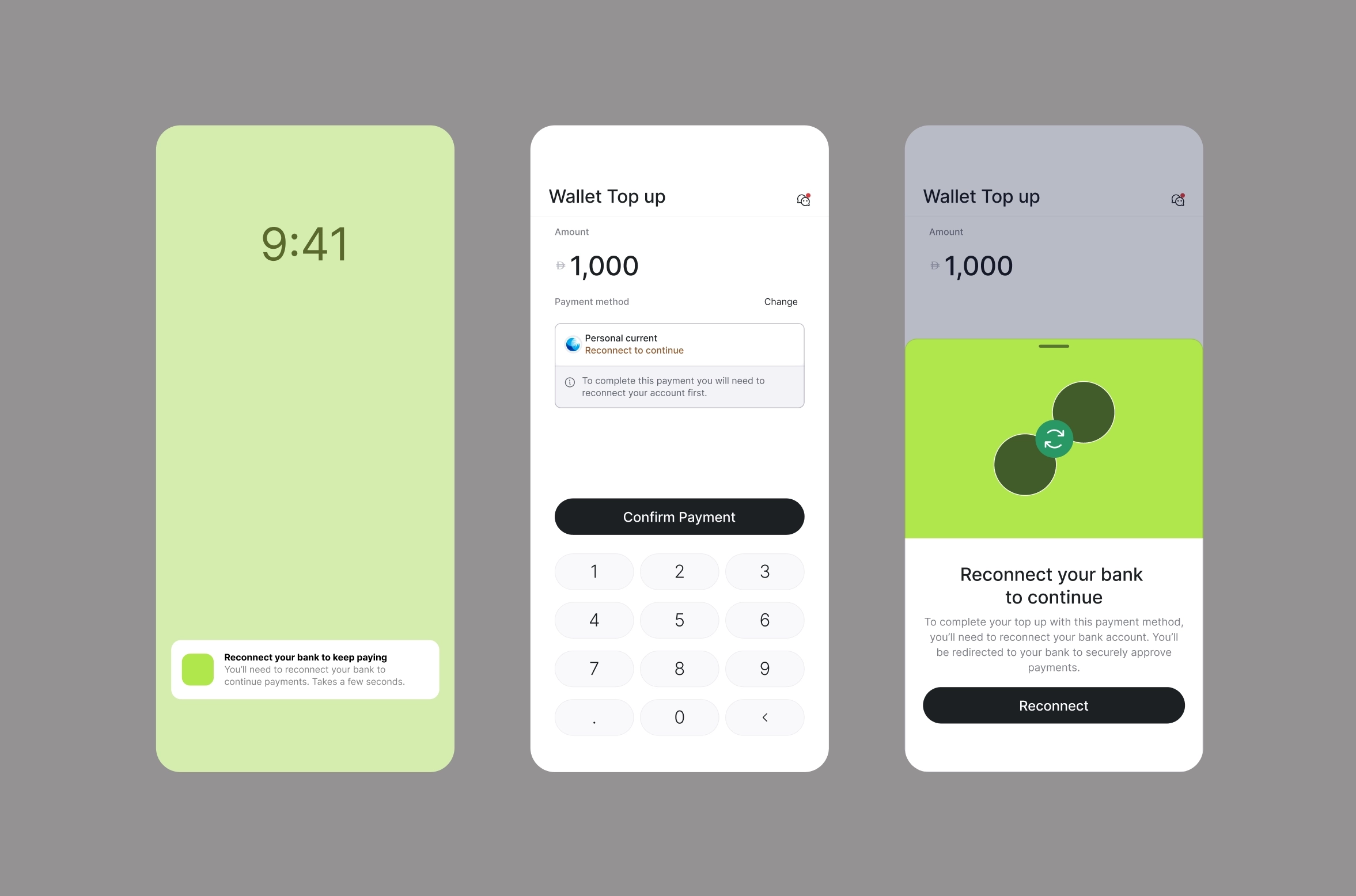
Here is a UX priming example ideal if you are using our Account-on-file payments solution:
UX handling for net new end users
- When you have net new end users (i.e they have not previously connected an acount on using Lean's legacy RE solution), you should present to them appropriate user priming, when they select Pay by Bank or when you promote the payment method in your application.
- This will help to educate the user and build trust around Pay by Bank as a payment method and support to reduce obstacles to first time conversion.
Here is a UX priming example:
Payment Method CTA Labeling
- As we transition, clients should continue to label the payment method CTA as “Pay by bank”.
- Post-transition (all banks on Open Finance), this must be updated to “Pay by bank with Al Tareq” in line with Open Finance rules.
- Your Lean Solutions Engineer will notify you when this change is required.
Branding Requirements
- Open Finance payment flows must follow Al Tareq branding rules defined by CBUAE / Nebras.
- The Lean SDK automatically applies compliant Al Tareq branding for all Open Finance–initiated flows.
- Legacy RE flows are not subject to Al Tareq branding requirements.
Bank Selection Screens
- If you use a custom bank selection screen, you may continue to do so as we transition. The main advantage of handling your own bank selection screen for migration is that this allows you to support a custom hybrid flow i.e you can choose which banks support a RE or OF flow.
- This allows your to begin your migration to Open Finance connectivity while maintaining broad bank market coverage by continuing to use RE connectivity for banks not yet available on Open Finance
- Lean will automatically route users to:
- Open Finance flow if the bank is OF-enabled
- RE flow if the bank is not yet OF-enabled
- When a bank is OF-enabled, the default user journey will be Al Tareq–branded, even if the account was previously connected via RE.
- Once all banks are enabled on Open Finance, your bank selection screen must comply with Al Tareq branding rules.
8. Important things to know
- The maximum transaction value for a single payment on Open Finance is limited to 50k AED - this is a regulatory requirement set by the CBUAE. This limit will be lifted in the future at the CBUAE’s discretion.
- Lean can enable Open Finance for the client via adding a dedicated feature flag to the client’s client app. Lean can also technically link specific bank identifiers to this FF/client app to selectively choose which banks are enabled on Open Finance versus RE.
Updated 3 months ago