
Fetching Bank Data: Open Finance Enablement
If you are an existing Lean client today consuming Lean's legacy Data API solution, this guide explains the steps you need to take to migrate to your integration to Open Finance. A step by step guide here.
Whats changing
Overview
- You will continue to use the same data V2 APIs — but Lean will now power them through Open Finance API connectivity directly with banks, not legacy bank connections.
- Note: data old V1 endpoints will not be supported with open finance banks.
- You benefit from API-first, regulatory-mandated Open Finance infrastructure, replacing older wrap-around integrations.
- Your users get a faster, cleaner, fully guided bank data sharing journey — no manual inputs, no OTP detours, no “reconnect required” by end-user.
- The same
connectSDK function supports consent, authentication, and redirect handling, along with some onboarding details to be shared in the Lean Application Dashboard. - This should not require major changes and the Open Finance ready banks will not be available on old flows. All merchants are required to do this change to continue an uninterrupted experience that mimics the existing experience we offer and is in full compliance with the Open Finance standard.
- Checkout the details on the data workflow and refreshing the data for active consents here.
Migration will deliver your users a faster, fully automated end-to-end sharing account information experience with fewer steps and less friction using native smartphone and desktop journeys with smooth app-to-app redirection.
Legacy data connect user flow
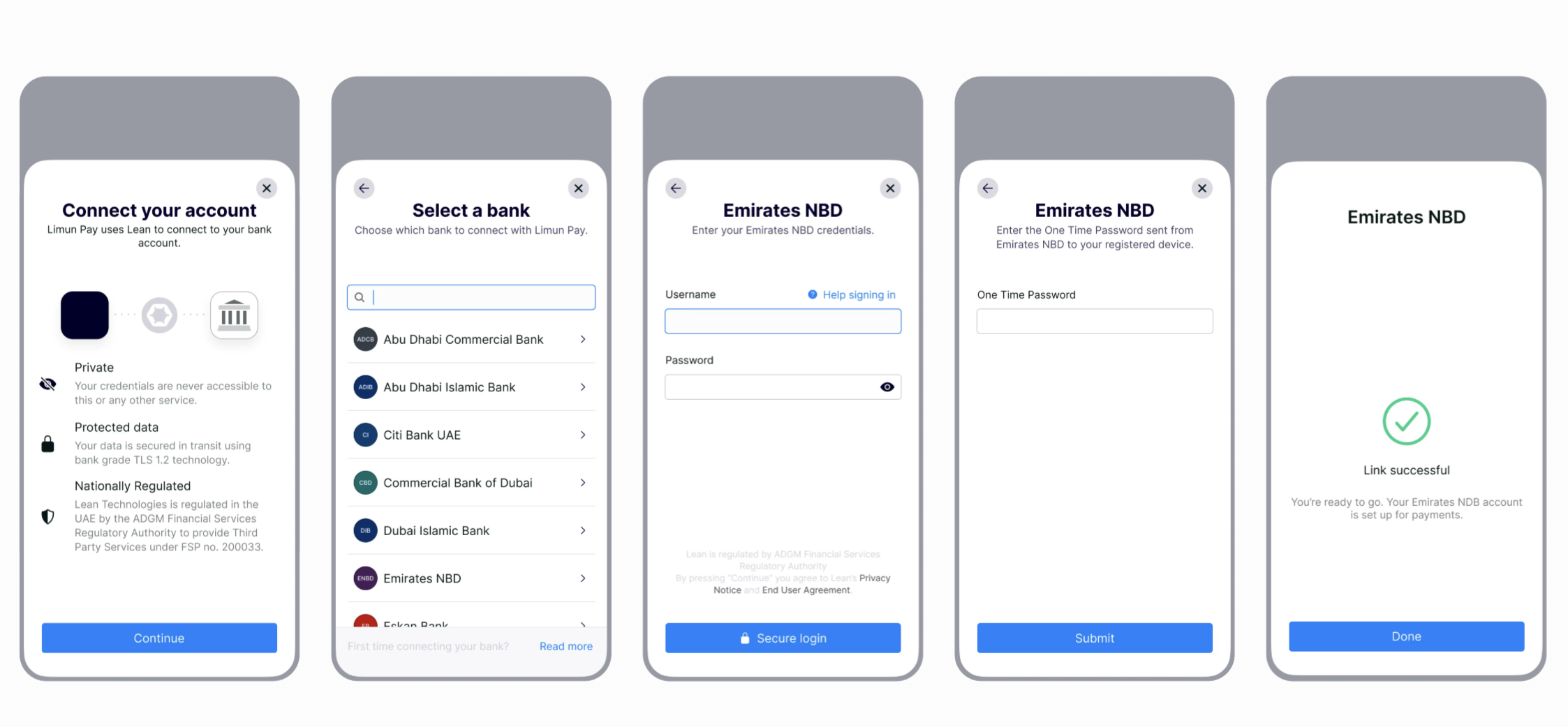
Data connect user flow (Open Finance)
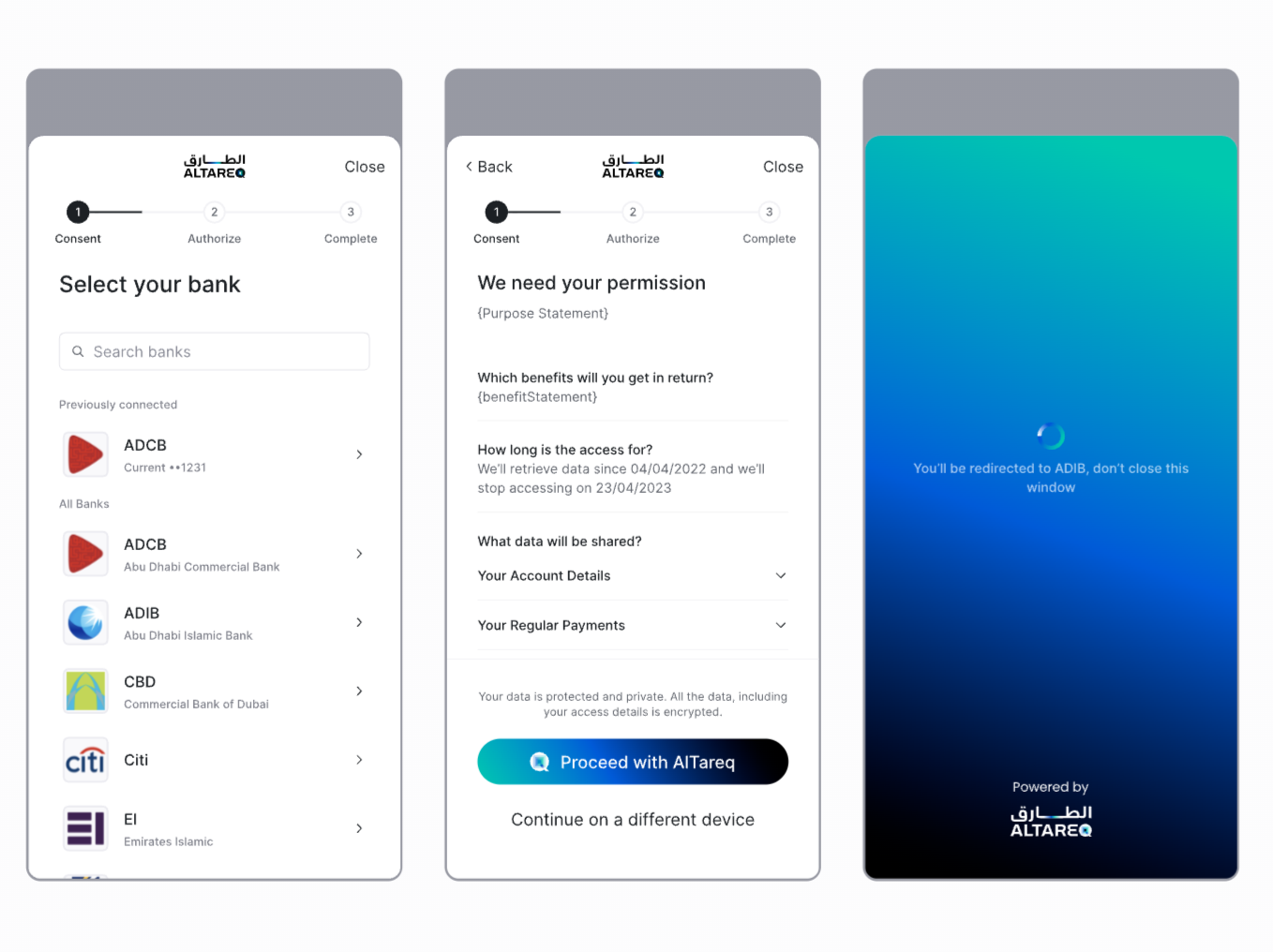
Note, the 'Al Tareq' branding in the Open Finance flow is mandatory for all Open Finance based user connections. It is a regulator driven brand initiative designed to foster end user trust and awareness
What you need to do
1. Configuration
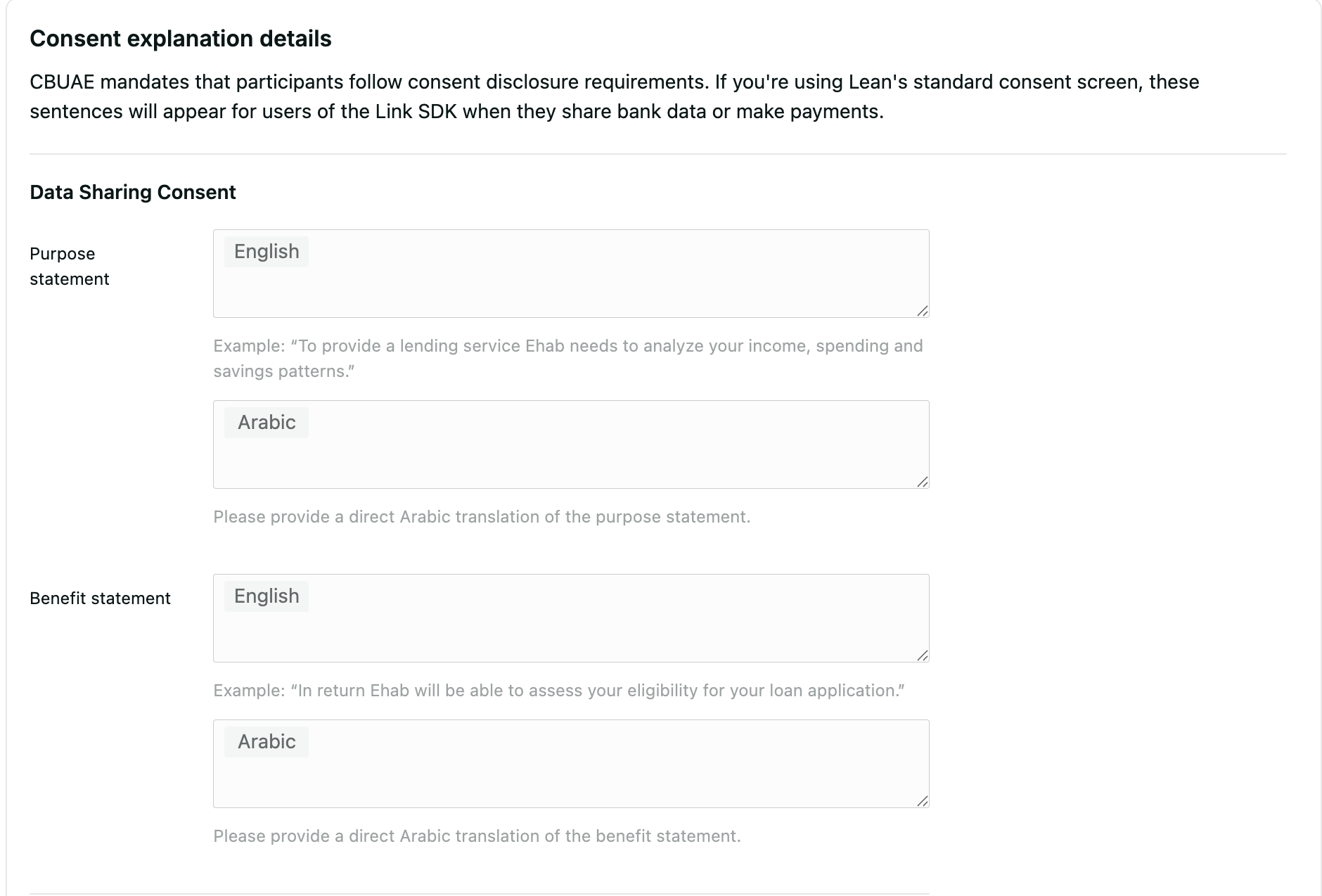
Consent copy of purpose and benefit statements
Open Finance requires you to keep your customers informed about the purpose of the bank data sharing and the reason for engagement. You can use the Settings tab in the Lean Application Dashboard to configure the following items, in both English and Arabic:
- Purpose statement for both data consents
- Benefit statement for both data consents
Redirect Urls
The Open Finance data sharing flow differs from the existing one. After the customer completes authentication and at their bank, Lean will redirect the user to the predefined URL provided during data connect flow initiation. For security reasons, this URL must be preconfigured in the Settings tab of the Lean Application Dashboard.
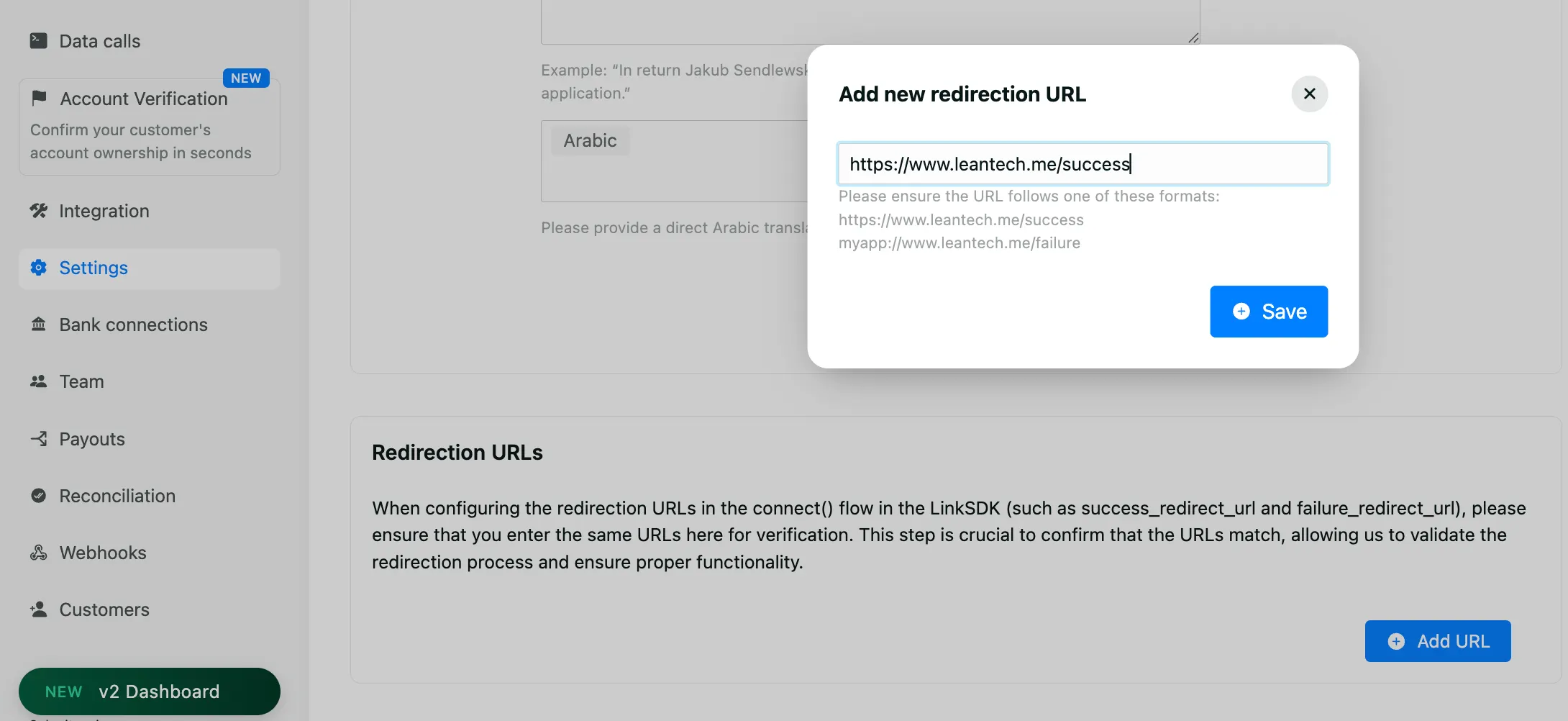
The redirect URL should display the data connect result screen provided by the Lean SDK’s captureRedirect function.
2. SDK
Connect Flow
To support the Open Finance flow, Lean requires you to pass the redirect URLs configured in the previous steps into the SDK’s connect function that establishes the consent between the client and the bank to retrieve account information. The full list of arguments would look as follows:
Additional parameters required for Open Finance connect flow:
| Name | Description |
|---|---|
| success_redirect_url | URL to redirect to on successful completion. |
| fail_redirect_url | URL to redirect to on failure or cancellation. |
| access_from | Start of the data access window. ISO 8601 date-time. |
| access_to | End of the data access window. ISO 8601 date-time. |
Account access
Lean.connect({
  app_token: "YOUR_APP_TOKEN",
  access_token: "<customer_access_token>",
  customer_id: "CUSTOMER_ID",
  permissions: [
    "identity", "accounts", "balance", "transactions", "identities",
    "scheduled_payments", "standing_orders", "direct_debits",
    "beneficiaries"
  ],
  sandbox: true,
  fail_redirect_url: "https://leantech.me/failure",
  success_redirect_url: "https://leantech.me/success",
  access_from: "2025-11-01T00:00:00+4:00", //optional (ISO 8601)
  access_to: "2027-11-01T00:00:00+4:00" //optional (ISO 8601)
  language: "ar|en" -- Lean SDK supports two languages: "en" (English, default) and "ar"
 (Arabic).
})It’s important that the redirect URLs are whitelisted in Lean Application Dashboard
An example of fail_redirect_url and success_redirect_url is your mobile app deep link. The user will be redirected to these links after they finish the consent authorization flow in the bank’s app.
Note: An update for your app is required for end-users to interact with the OF-enabled bank, and a force update is strongly recommended to make sure the new SDK parameters are configured.
Capturing Redirect
After the authorisation flow completes, Lean redirects the customer to the configured redirect URL, appending a set of query parameters that describe the outcome of the attempt. These parameters include identifiers that your application can use to verify and persist the result.
To present the final authorisation result to the customer, call the captureRedirect() function provided by the Lean Link SDK and pass the parameters received in the redirect.
https://success.leantech.me?entity_id=d7a641e7-61d4-45ed-86cb-7c2378be58e0&bank_identifier=MOCK_OF_UAE&customer_id=80306890-cc6e-476c-b2a0-c5f7d87416ef&consent_attempt_id=931f580b-03c1-4800-a1bb-68737bfde7Lean.captureRedirect({
app_token: "<your_app_id>",
access_token: "<customer_access_token>",
consent_attempt_id: "<from_query_param>",
customer_id: "<from_query_param>",
granular_status_code: "<from_query_param>", -- optional (only in case of failure)
status_additional_info: "<from_query_param>", -- optional (only in case of failure)
sandbox: true,
language: "ar|en" -- Lean SDK supports two languages: "en" (English, default) and "ar"
(Arabic).
})This should result in a screen similar to
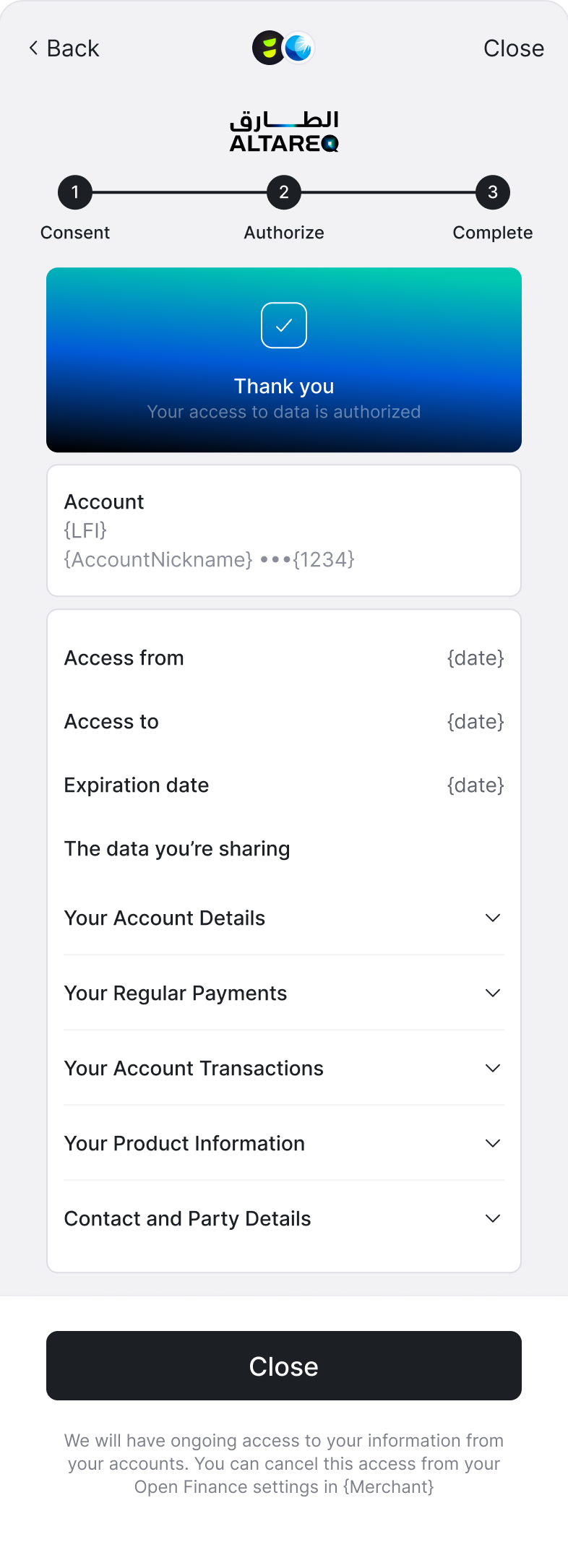
And for short lived consent the result will be as below
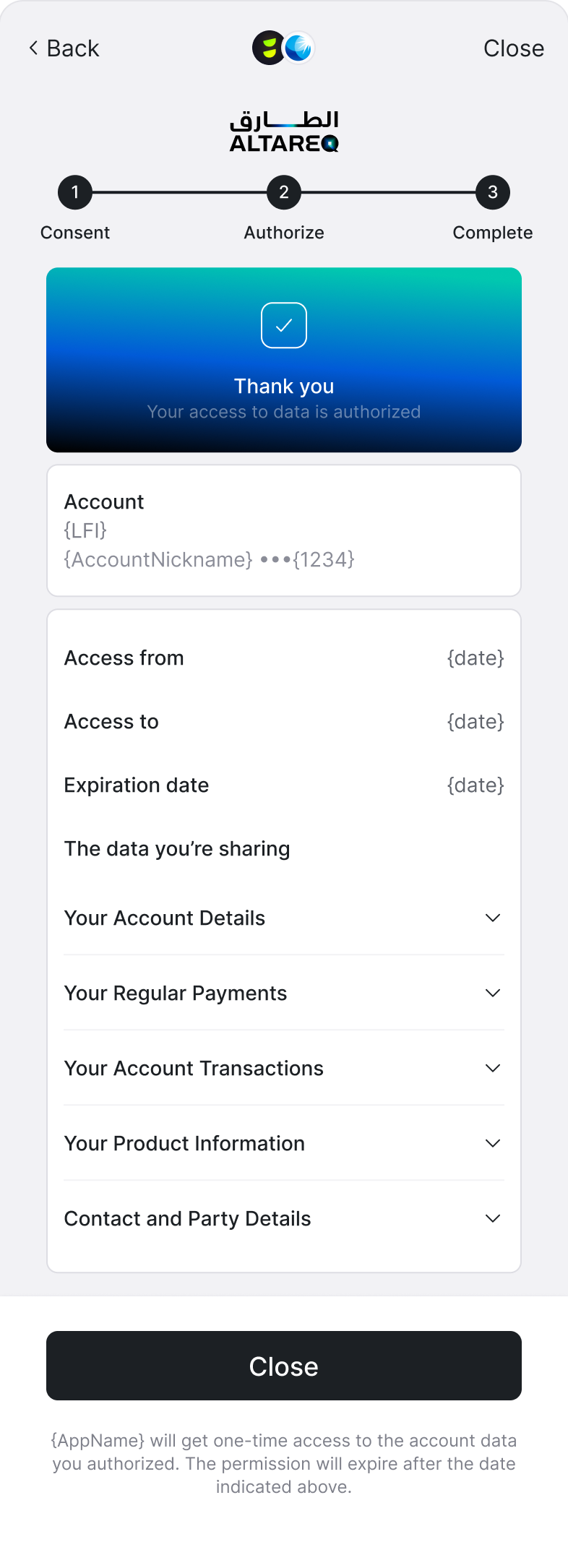
4. Handling Webhooks
Open finance based account information use two separate webhooks to notify you about the change in your entity state. First one is the familiar entity.created which represents successful connection of an entity with the bank. Second is entity.data.refresh.updated that will carry any subsequent status notification of fetching the data from the bank.
Entity Created Webhook
Note: a similar webhook 'entity.created' will be triggered in case of connecting the same bank for the same customer
{
    "type": "entity.created",
    "message": "An entity object has been created.",
    "payload": {
      "id": "79a59cd9-d95c-43ec-9a8f-9a203b9085f2",
      "app_user_id": "OF_USER_1",
      "customer_id": "46e347b6-ad9b-4a35-9f68-23de08c182b0",
      "permissions": [
        "transactions",
        "balance",
        "identity",
        "accounts"
      ],
      "bank_details": {
        "logo": "https://cdn.leantech.me/img/bank-assets/uae/glyphs/mashreq/of_mock_uae.png",
        "name": "Mashreq Bank PSC",
        "bank_type": "RETAIL",
        "identifier": "MOCK_OF_UAE",
        "main_color": "#1B4298",
        "account_type": "PERSONAL",
        "background_color": "#ffffff"
      }
    },
    "event_id": "5894d41c-032e-4cbe-84c2-7f76e593943d",
    "timestamp": "2026-01-12T15:07:06.12498602Z"
  }
Entity Data refresh Updated Webhook
Note: it's recommended to start fetching the raw data & insights APIs for the connected entity upon receiving the entity.data.refresh.updated with overall status as FINISHED or per data API per account.
For more details on the data workflow, please checkout the guide here.
{
  "type": "entity.data.refresh.updated",
  "message": "An entity data refresh state has been updated.",
  "payload": {
    "refresh_id": "d4718195-fef6-43ff-a3aa-69fc257752ab",
    "entity_id": "d4718195-fef6-43ff-a3aa-69fc257752ab",
    "customer_id": "d4718195-fef6-43ff-a3aa-69fc257752ab",
    "status": "PENDING/FINISHED", -- The overall status for all data types and all accounts
    "data_status": {
      "accounts": "PENDING/OK/FAILED/UNSUPPORTED",
      "identity": "PENDING/OK/FAILED/UNSUPPORTED",
      "account_data": [

			-- status break down per data type per account
      {

		      "account_id": "d4718195-fef6-43ff-a3aa-69fc257752ab",
		      "balance": "PENDING/OK/FAILED/UNSUPPORTED",
		      "identity": "PENDING/OK/FAILED/UNSUPPORTED",
		      "transactions": "PENDING/OK/FAILED/UNSUPPORTED",
		      "scheduled_payments": "PENDING/OK/FAILED/UNSUPPORTED",
		      "direct_debits": "PENDING/OK/FAILED/UNSUPPORTED",
		      "standing_orders": "PENDING/OK/FAILED/UNSUPPORTED",
		      "beneficiaries": "PENDING/OK/FAILED/UNSUPPORTED",
          "transaction_availability": {
						-- the ready range of transactions to fetch
			      "start": "<DateTime>",
			      "end": "<DateTime>"
            }
		    },{
		      "account_id": "b5098d49-840d-459e-9ea1-d02901af9b8c",
		      "balance": "PENDING/OK/FAILED/UNSUPPORTED",
		      "identity": "PENDING/OK/FAILED/UNSUPPORTED",
		      "transactions": "PENDING/OK/FAILED/UNSUPPORTED",
		      "scheduled_payments": "PENDING/OK/FAILED/UNSUPPORTED",
		      "direct_debits": "PENDING/OK/FAILED/UNSUPPORTED",
		      "standing_orders": "PENDING/OK/FAILED/UNSUPPORTED",
		      "beneficiaries": "PENDING/OK/FAILED/UNSUPPORTED",
		      "transaction_availability": {
			      "start": "<DateTime>",
			      "end": "<DateTime>"
			    }
		    }
      ]
    }
  }
}
5. All raw data & insights APIs
| Type | APIs |
|---|---|
| Raw data (only non-PII data accessable) | |
| Insights | |
| Verification |
6. Consent Management
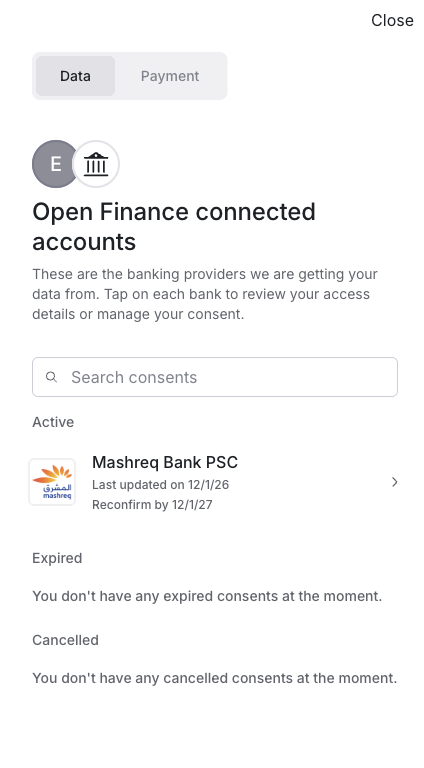
The manageConsents flow allows your end-users to view and manage their OpenFinance data consents and payment consents.
To present the consent to the customer, call the manageConsents() function provided by the Lean Link SDK and pass the customer id:
Lean.manageConsents({
  app_token: "<your_app_id>",
  access_token: "<customer_access_token>",
  customer_id: "<from_query_param>",
  sandbox: true
})
This should result in a screen similar to
7. UX/UI guidelines
Branding Requirements
- Open Finance data sharing flows must follow Al Tareq branding rules defined by CBUAE / Nebras.
- The Lean SDK automatically applies compliant Al Tareq branding for all Open Finance–initiated flows.
- Legacy RE flows are not subject to Al Tareq branding requirements.
Bank Selection Screens
- If you use a custom bank selection screen, you may continue to do so during migration.
- Lean will automatically route users to:
- Open Finance flow if the bank is OF-enabled
- RE flow if the bank is not yet OF-enabled
- When a bank is OF-enabled, the default user journey will be Al Tareq–branded, even if the account was previously connected via RE.
- Once all banks are migrated, your bank selection screen must comply with Al Tareq branding rules.
8. Important things to know
- Lean can enable Open Finance for the client via adding a dedicated feature flag to the client’s client app. Lean can also technically link specific bank identifiers to this FF/client app to selectively choose which banks are enabled on Open Finance versus RE.
Updated 2 days ago