
Getting started with Account-on-file Payments
Pay by bank solution supporting variable value end user and merchant initiated payments ideal for loan collections, faster return deposit and frequently returning checkout use cases.
Overview
Account-on-file Payments enable you to initiate payments on behalf of your customers using long-lived authorisation. Once a customer grants consent through their bank, you can initiate multiple payments on demand within the approved limits, without requiring the customer to re-authorise each payment.
This model is designed for repeat or ongoing payments, such as express checkout, deposits, or collections.
Prerequisites
- Configured application for Open Finance
- Created a Payment Destination
- Created a Customer with a linked Government Identifier
If you are an an existing customer integrated with Lean's legacy payment solution, please read our 'Migrating from Legacy Payments to Account-on-file' guide
For compliance reasons, all payments initiated using long-lived consent (such as Account-on-File) must include the customer's emirates ID as their unique government identifier
How it works
The Account-on-file payment flow consists of the following steps:
- Create an Account-on-file consent that defines the permitted limits and parameters for future payments.
- Use LinkSDK to guide the customer through consent review and redirect them to their bank for authorisation.
- Initiate payments programmatically using backend-to-backend API calls, within the scope of the authorised consent.
- Receive real-time payment and consent status updates via webhooks.
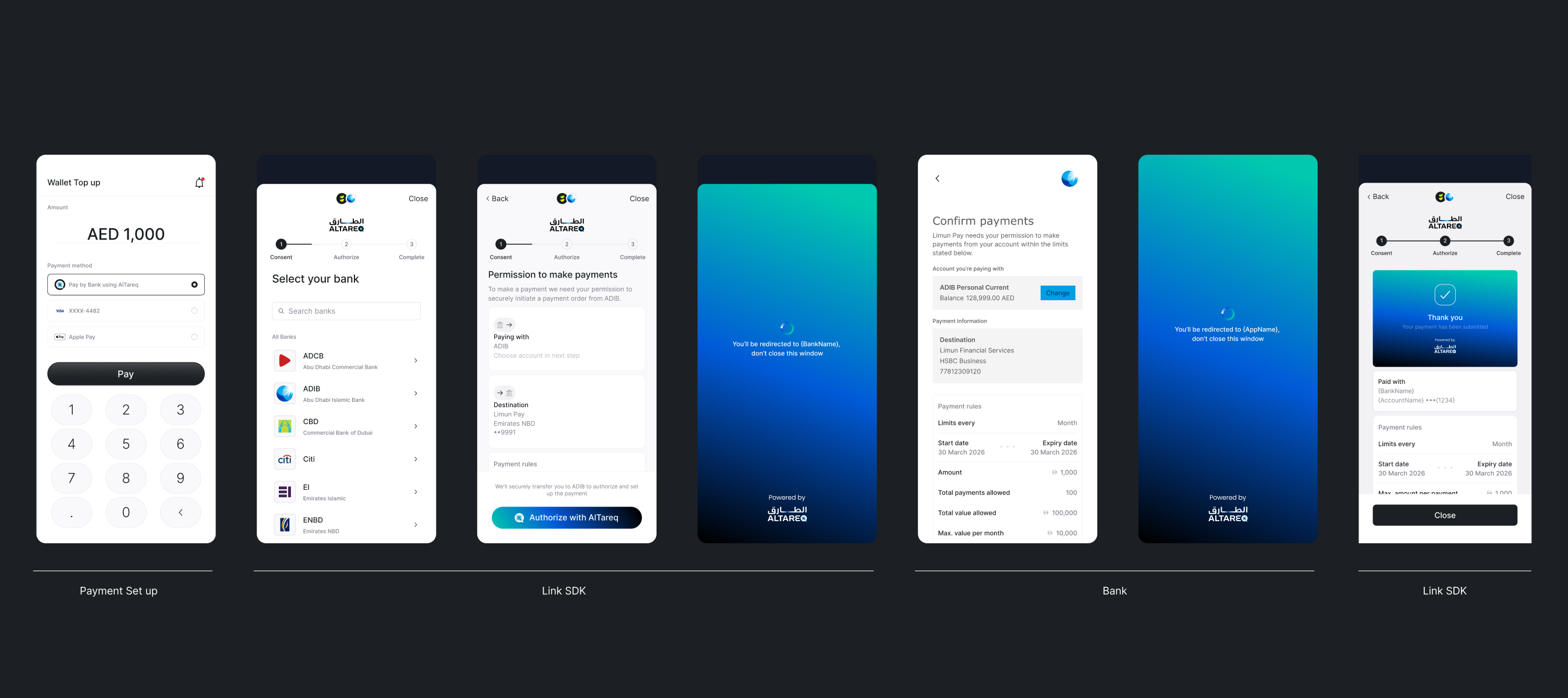
If your use case requires an immediate payment when you create an account-on-file consent e.g. for Loan down payments or initial wallet deposits have a look at our guide for Account-on-file with immediate payment
Account-on-file flow diagram
sequenceDiagram
    autonumber
    actor C as Customer
    participant APP as Your app (frontend)
    participant SDK as Lean LinkSDK
    participant BE as Your backend
    participant LEAN as Lean API

    %% 1) Create consent (backend-to-backend)
    rect rgba(255,255,255,0.1)
    Note over BE,LEAN: 1) Create an Account-on-file consent
    BE->>+LEAN: POST /consents/account-on-file
    LEAN-->>-BE: 200 OK (consent_id)
    end

    %% 2) Authorise consent (LinkSDK + bank redirect)
    rect rgba(245,255,255,0.1)
    Note over APP,SDK: 2) Authorise the consent via LinkSDK
    APP->>SDK: authorizeConsent(consent_id)
    SDK-->>C: Show consent review screens
    Note over C,LEAN: Customer is redirected to their bank to authorise consent
    Note over APP,SDK: Capture the redirect back to your app
    APP->>SDK: captureRedirect()
    SDK-->>C: Show consent authorisation result
    end

    %% 3) Initiate payments (backend-to-backend) within consent scope
    rect rgba(255,255,255,0.1)
    Note over BE,LEAN: 3) Initiate payments
    BE->>+LEAN: POST /payments/account-on-file
    LEAN-->>-BE: 200 OK (payment_id)
    end

    %% 4) Webhooks (payment updates)
    rect rgba(255,255,255,0.1)
    Note over LEAN,BE: 4) Receive payment status updates
    LEAN-->>BE: Webhook: [payment.created, payment.updated]
    end

    %% 4) Webhooks (consent updates can arrive anytime after creation/authorisation)
    rect rgba(255,255,255,0.1)
    Note over LEAN,BE: 4) Receive consent status updates
    LEAN-->>BE: Webhook: [consent.status.updated]
    end
Because Account-on-file payments use long term consents, its required that end users must be able to view and mange consents, see the Consent Management guide for more details
Updated 7 months ago