
Consent Management
Overview
Open Finance rules require that your end users can access, view and manage the long-lived consents and payment history authorized between their bank and your application. This must be exposed through a dedicated management interface.
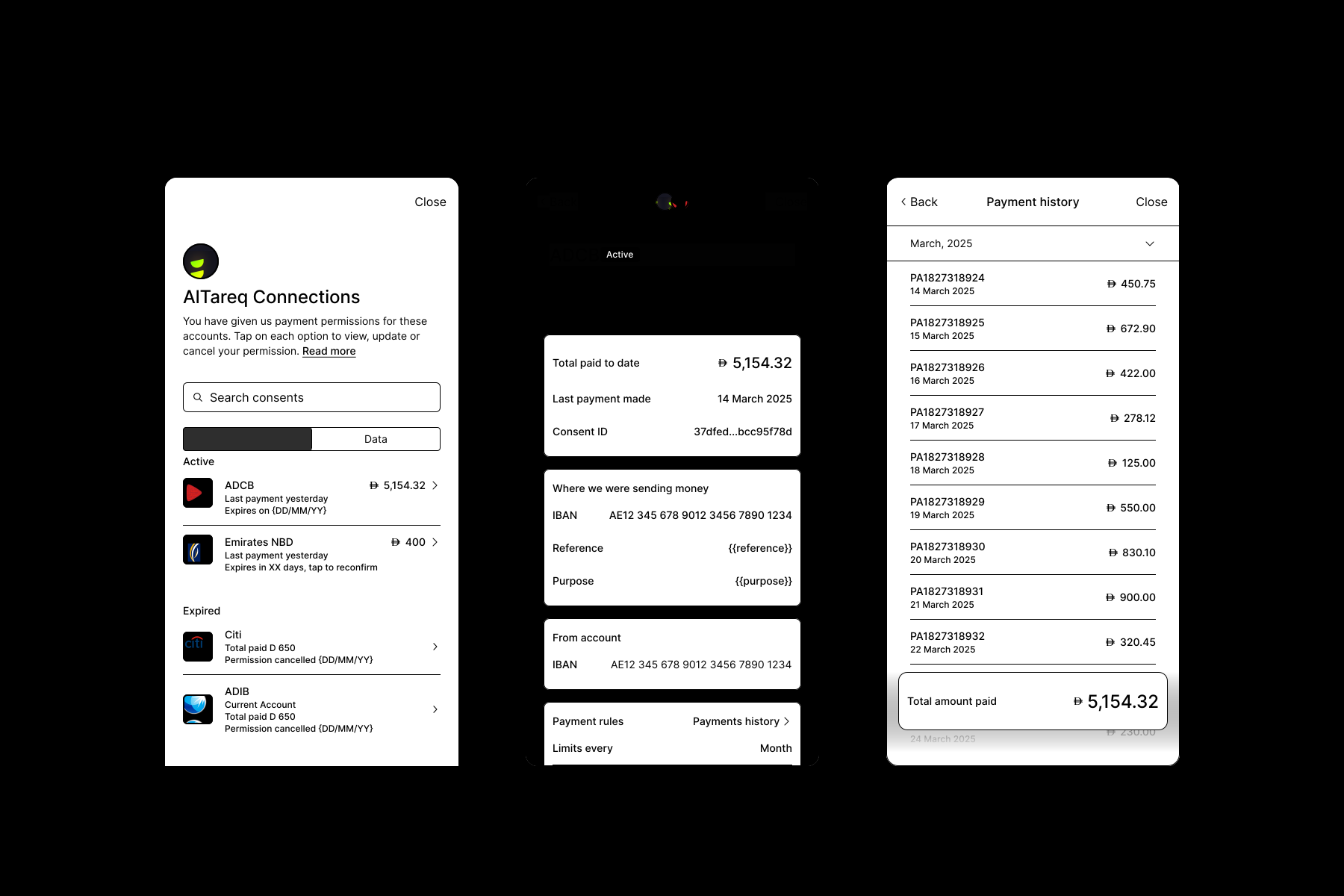
To satisfy this, call manageConsents() in the Link SDK. This presents the management interface to the user, where they can view and manage everything authorized between their bank account and your application:
- Account-on-File consents and their associated payment history
- Single Instant Payments history
- Data consents
manageConsents({
    app_token: "your_app_token",
    customer_id: "your_customer_id",
    access_token: "your_customer_scoped_access_token",
    consent_id: "optional_consent_id", // OPTIONAL
    consent_type: "optional_consent_types" // OPTIONAL
})- Passing the optional
consent_idfield launchesmanageConsents()and lands the user directly on the consent overview screen for thatconsent_idskipping the consent selection menu (see second screen below). - Passing the
consent_typequery parameter is recommended (payment,dataorpayment_history). Theconsent_typerenders only the tabs for the passed value(s). If multiple values are passed, all corresponding tabs render. The user lands on the tab for the first passedconsent_typeby default. - The consent type mapping and what renders is as follows:
| Product | consent_type param | what renders in SDK |
|---|---|---|
| Single Instant Payments | payment_history | Payment history tab only showing all historic SIP payments between the user and the merchant |
| Account-on-file consents | payment | Payment consent tab showing all current and historic AoF consents between the user and the merchant AND a payment history tab showing all historic payments initiated via those consents |
| Data consents | data | Data consent tab showing all current and historic long term data consents between the user and the merchant |
- If no
consent_typevalue is passed,manageConsents()renderspayment,payment_historyanddatatabs, with the user landing on thedatatab by default. - If you have an Account-on-File integration only, we recommend passing
consent_type: payment- this will render a tab with the users active and historic Account-on-File consents details and a payment history tab containing a full history of all payments associate with their consents
See UI/UX example below:
Consent revocation
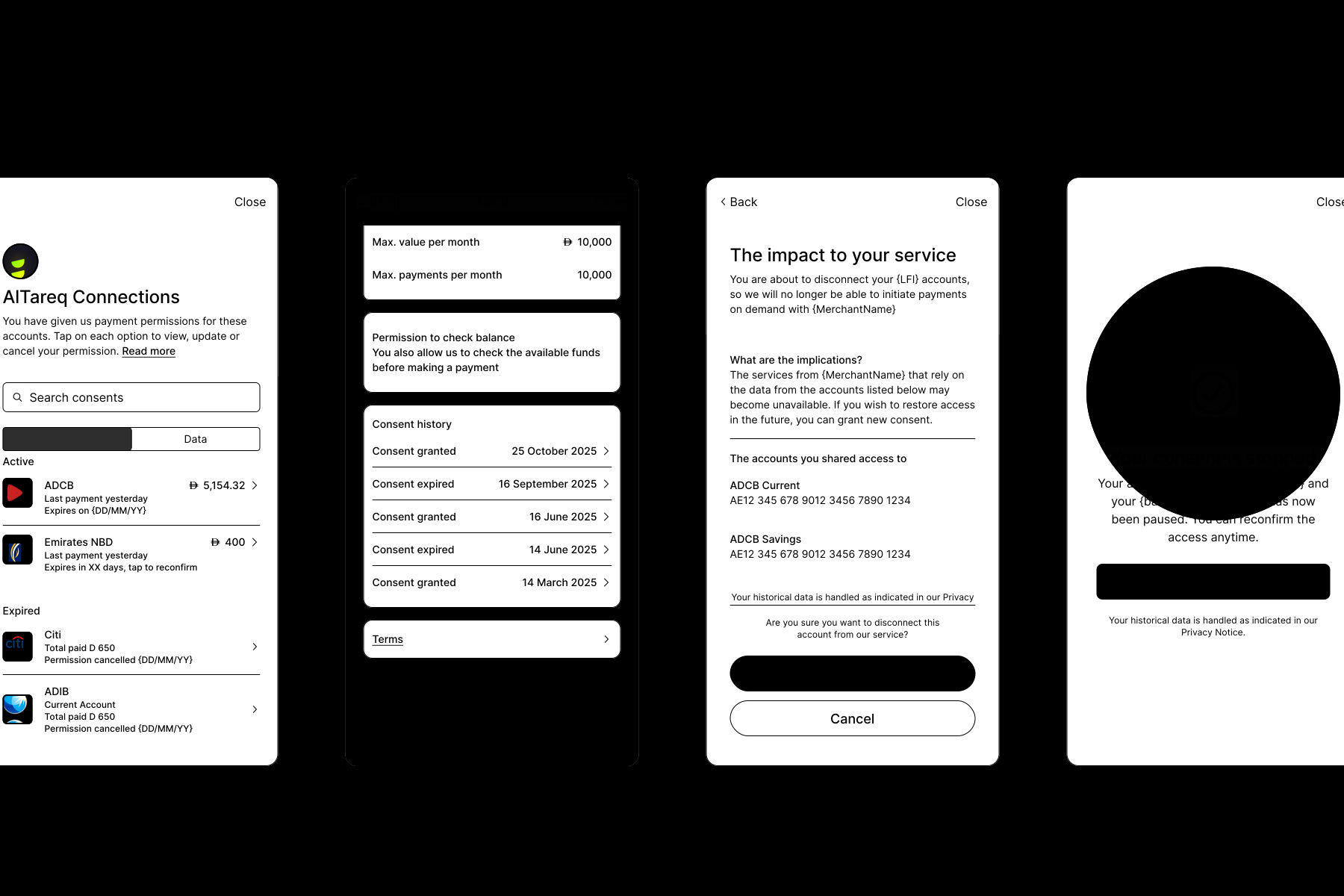
Open Finance rules mean that it is mandatory that customers must be able to 'Revoke' (Cancel) an 'Authorised' long lived consent at anytime including Account-on-file payments consents. Customers can do this via the Consent Management Interface called from your application via the Link SDK.
In the scenario, that a customers does 'revoke' a consent, Lean will notify you with a consent.status.updated web hook to ensure you are kept updated.
See UX example below:
Customers can also 'revoke' consent directly with their bank; in this scenario Lean will also communicate the consent status change to you via
consent.status.updatedweb hook
Customers may need to revoke an Account-on-file payments consent directly in certain scenarios, for example:
- The end user has permanently closed their account with the customer
- Fraudulent activity has been detected
- Revoking an existing consent nearing expiry once a replacement consent has been authorised, ensuring a seamless renewal experience for the end user.
For this Lean, provides an optional consents/v1/id/revocation endpoint.
consents/v1/id/revocationis for customer-initiated revocations only and does not replace the manageConsents()` SDK function. Providing end users the ability to view and revoke their own consents at any time is a mandatory regulatory requirement and must be implemented as part of any Account on File payments integration.
{
  "reason": "CONSENT_RENEWAL", // mandatory
  "additional_context": "USER_CANCELLED" // optional
}
Updated 3 months ago