
Customize a Payment Link
Configure the Payment Link to control how it behaves, what information it collects, and where the payment is sent.
Use Lean Dashboard to customize the link without writing code or Payment Links API to programmatically configure the link.
Name the link
Use name to make the link easier to identify in the Dashboard later. This field is for your team only and is not shown to customers.
curl -X POST https://api.leantech.me/payment-links/v1 \
    -H "Authorization: Bearer <your_token>" \
    -H "Content-Type: application/json" \
    -d '{
    "name": "Digital License Key Promo",
    "redirect_url": "https://yoursite.com/checkout/complete",
    "payment_details": {
      "reference": "INV-1042",
      "currency": "AED",
      "amount": 1500.00
    }
    }'
Limit the number of payments
Use max_usages to control how many completed payments a link can accept.
Set "max_usages": 1 for a single-use link, or a higher value for a shared payment page.
If you do not provide max_usages, the link can accept up to 1,000 completed payments.
curl -X POST https://api.leantech.me/payment-links/v1 \
    -H "Authorization: Bearer <your_token>" \
    -H "Content-Type: application/json" \
    -d '{
    "max_usages": 1,
    "redirect_url": "https://yoursite.com/checkout/complete",
    "payment_details": {
      "reference": "INV-1042",
      "currency": "AED",
      "amount": 1500.00
    }
    }'
Set an expiry date
Use expires_at when the link should stop accepting payments after a specific time.
This is useful for time-sensitive payment requests, such as invoices, registrations, or limited-time campaigns.
curl -X POST https://api.leantech.me/payment-links/v1 \
    -H "Authorization: Bearer <your_token>" \
    -H "Content-Type: application/json" \
    -d '{
    "expires_at": "2026-06-30T23:59:59Z",
    "redirect_url": "https://yoursite.com/checkout/complete",
    "payment_details": {
      "reference": "INV-1042",
      "currency": "AED",
      "amount": 1500.00
    }
    }'
Associate link with a customer
Use customer_id to bind the payment link to a specific customer in your system.
If provided, all payments made through the link are associated with that customer.
curl -X POST https://api.leantech.me/payment-links/v1 \
    -H "Authorization: Bearer <your_token>" \
    -H "Content-Type: application/json" \
    -d '{
    "customer_id": "26b69ba5-0447-45b6-be7d-376d6b432843",
    "redirect_url": "https://yoursite.com/checkout/complete",
    "payment_details": {
      "reference": "INV-1042",
      "currency": "AED",
      "amount": 1500.00
    }
    }'
Change the payment destination
Use destination_id to override the default payment destination for your application.
If omitted, Lean sends the payment to your application’s default destination.
curl -X POST https://api.leantech.me/payment-links/v1 \
    -H "Authorization: Bearer <your_token>" \
    -H "Content-Type: application/json" \
    -d '{
    "destination_id": "26438bf6-0d33-4f11-a025-a9d5294be012",
    "redirect_url": "https://yoursite.com/checkout/complete",
    "payment_details": {
      "reference": "INV-1042",
      "currency": "AED",
      "amount": 1500.00
    }
    }'
Collect customer information
By default, the checkout only asks the customer to select their bank and authorize the payment.
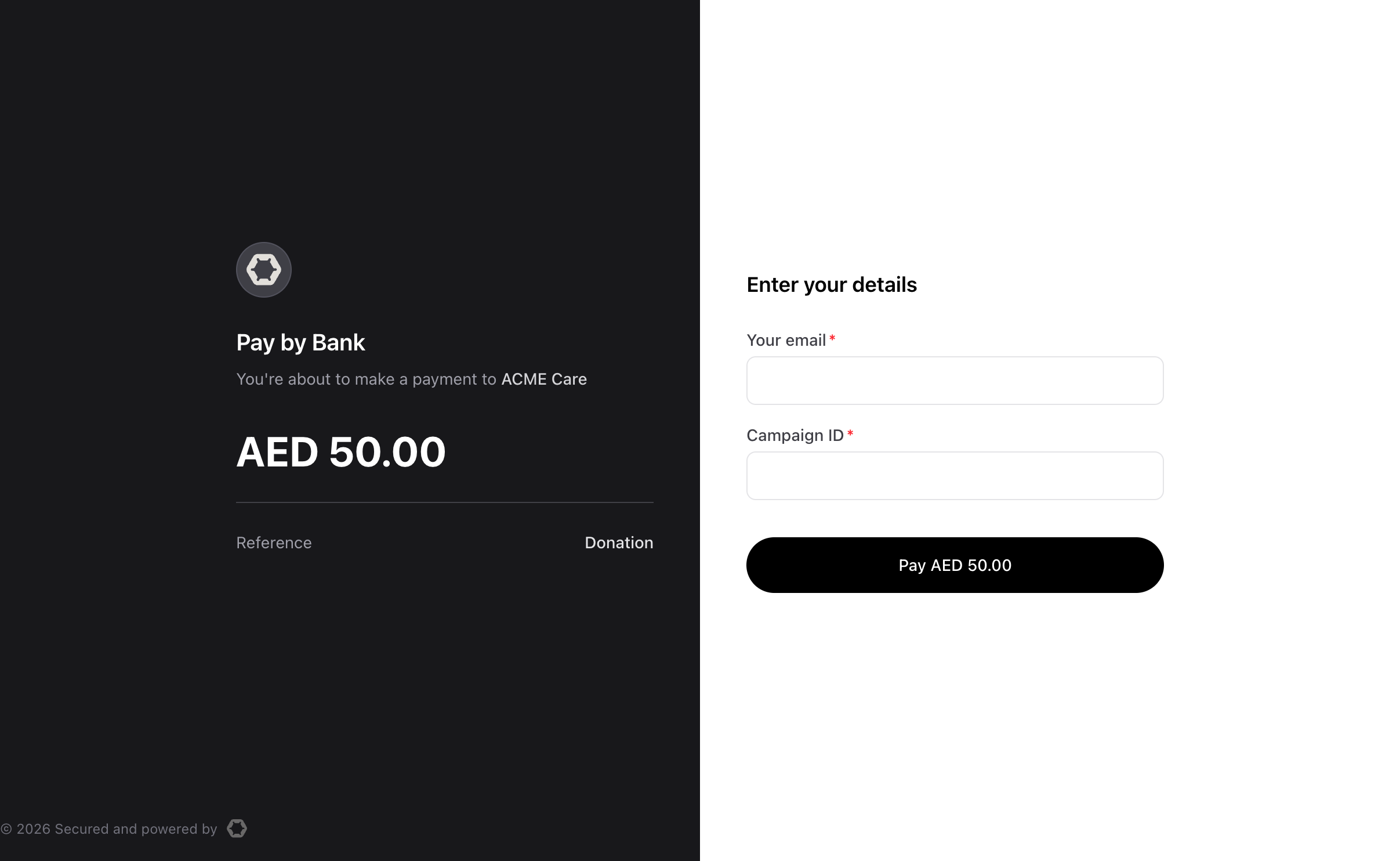
You can configure Payment Link to collect additional information before payment by passing an identifiers array when you create the link.
This is useful when you need information for reconciliation, follow-up, or internal record keeping. Lean collects the data during checkout and stores it with the payment usage.
Supported field types
Lean supports three identifier types:
| Type | Use it for |
|---|---|
EMAIL | Collect an email address |
MOBILE_PHONE | Collect a phone number |
TEXT | Collect a custom value such as an order number or employee ID |
Add identifiers to a link
Each identifier must include a type. You can also set:
display_labelto control the field label shown to the customerrequiredto make the field mandatorylimitforTEXTfields
curl -X POST https://api.leantech.me/payment-links/v1 \
    -H "Authorization: Bearer <your_token>" \
    -H "Content-Type: application/json" \
    -d '{
    "identifiers": [
        {
          "type": "EMAIL",
          "required": true
        },
        {
          "type": "TEXT",
          "display_label": "Campaign ID",
          "limit": 50,
          "required": true
        }
    ],
    "redirect_url": "https://yoursite.com/checkout/complete",
    "payment_details": {
      "reference": "INV-1042",
      "currency": "AED",
      "amount": 1500.00
    }
    }'
Lean renders the fields in the order you define them. If you do not provide a display_label, Lean uses a default label based on the field type.
Accessing collected data
After each payment, the values your customer entered are stored with that usage and accesible through Lean Dashboard under the link's usage history or Payment Links API. Each usage entry shows when the payment happened, the collected identifier values, and the payment status.
curl -X GET https://api.leantech.me/payment-links/v1/26b69ba5-0447-45b6-be7d-376d6b432843/usages
     -H "Authorization: Bearer <your_token>"
Design customer fields carefully
A few guidelines help keep payment link friction low:
- Only mark a field as required when you truly need it to process the payment
- Use labels your customer will immediately understand
- Keep
TEXTfields short and bounded with a sensiblelimit
Updated about 1 hour ago